
The invalid status error in MyAccount is linked to mismatched settings in the website configuration record and what NetSuite anticipates for support case statuses.
In this article, we’ll explore a specific instance faced by one of our clients who was using Support Cases on SuiteCommerce My Account. When trying to submit a new case on the site, users encountered this error: "You have entered an Invalid Field Value 1 for the following field: status."
Here’s how we assisted our client in resolving this issue!
Understanding the Cause of the Invalid Status Error
This particular error arises due to the discrepancy in settings within the website configuration record and those expected in NetSuite regarding support case statuses.
Interested in learning more about Support Cases in SuiteCommerce My Account? Take a look at our article on the User Experience of Support Cases in My Account.
Steps to Troubleshoot and Fix the Error in MyAccount
To address this issue, follow these outlined steps:
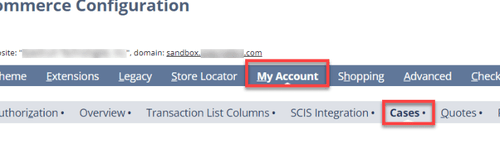
Step 1: Navigate to Commerce > Websites > Configuration, and select the affected domain and website.
Step 2: Click on the My Account subtab and then the Cases section.
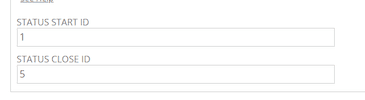
Step 3: Examine the values in the "Status Start ID" and "Status Close ID" fields.
Step 4: Proceed to Setup > Support > Case Statuses.
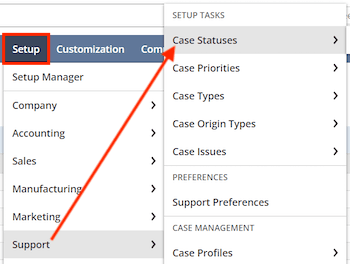
Step 5: Review the active statuses displayed and take note of their Internal IDs, particularly those marked as “Open” and “Closed” in the Case Status column.
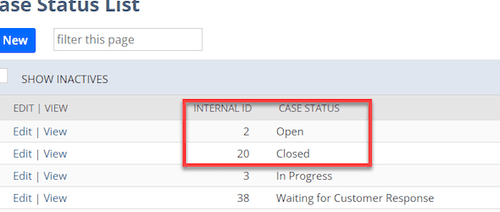
Step 6: Return to the configuration record and input the Internal IDs for the Open and Closed case statuses in the respective fields. For this instance, it should reflect:
Status Start ID = 2
Status Close ID = 20
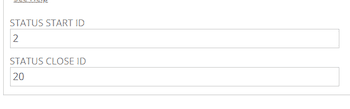
Step 7: Click ‘Save’ on the configuration record.
Perform some test cases to ensure the problem is fixed.




