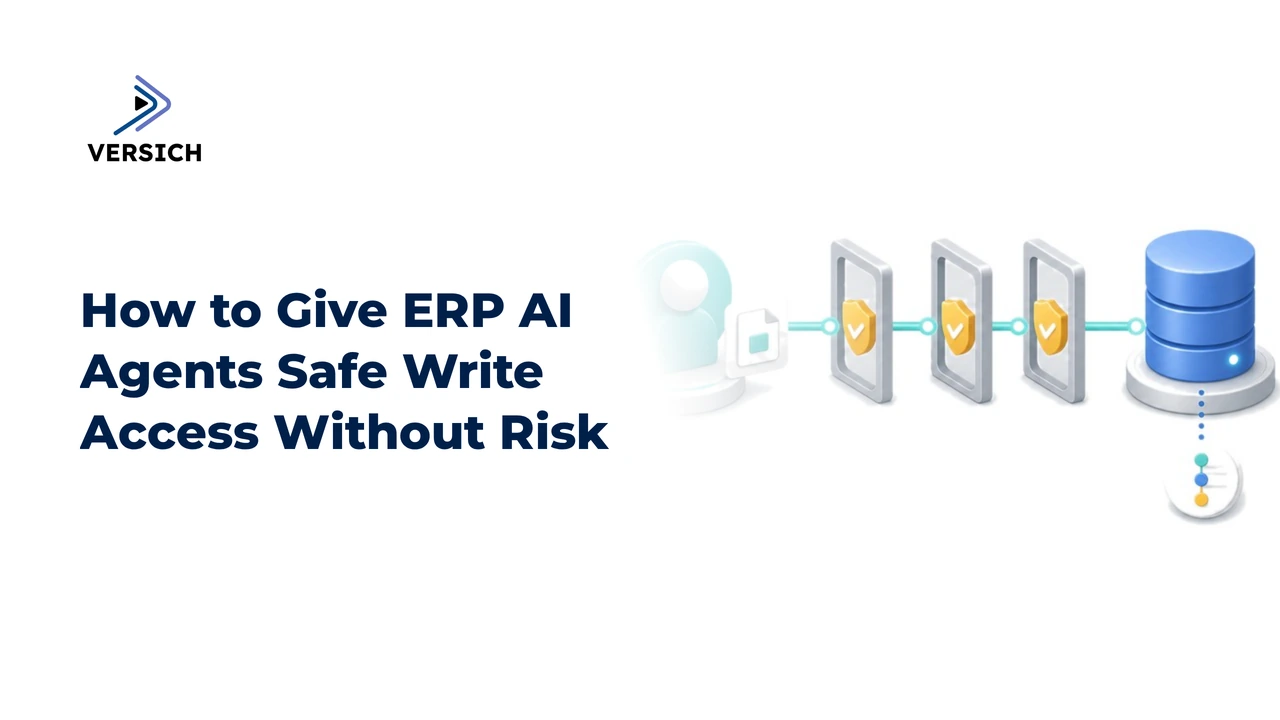
ERP AI agents need more than a username and password to write safely to business records. Safe write access means giving an agent a narrow identity, limited tools, restricted records and fields, validated inputs, approval gates for high-impact actions, and an audit trail for every attempted and completed change. The agent should move through controlled stages, such as read, analyze, recommend, draft, and commit, instead of receiving unrestricted permission to modify the ERP.
That distinction matters because an ERP write is not just a technical update. Creating a purchase order, changing a customer credit limit, editing a vendor record, posting a journal entry, or modifying payment instructions can affect money, compliance, reporting, and operational continuity. We should treat the agent as an untrusted decision-making component, not as a general-purpose employee account.
What Does Safe Write Access for ERP AI Agents Mean?
Safe write access is a control model that lets an ERP AI agent perform specific approved changes while preventing unrelated actions. The model combines identity management, least-privilege permissions, tool restrictions, data validation, human oversight, transaction controls, and tamper-resistant logging.
A useful design separates five stages of agent activity:
| Agent stage | What the agent does | Typical access | Human involvement |
|---|---|---|---|
| Read | Retrieves approved ERP records | Read-only tools and selected fields | Not always required |
| Analyze | Compares records against rules or context | Read-only data plus calculations | Review exceptions |
| Recommend | Suggests a change or next action | No commit permission | Required for sensitive recommendations |
| Draft | Prepares a transaction without posting it | Draft or pending-state permission | Reviewer checks proposed values |
| Commit | Applies an approved change | Narrow write tool for one operation | Approval or policy gate required |
This staged approach is safer than treating access as a binary choice between read-only and full write access. An agent that drafts an invoice correction does not need permission to post journal entries. An agent that creates a purchase order from an approved requisition does not need access to edit vendor bank details.
Versich’s guidance on connecting AI agents to ERP systems with controlled access covers the broader principle: each agent should receive only the tools and permissions required for its defined workflow.
Why Direct ERP Credentials Create Write Risk
Direct credentials create risk because they bundle many capabilities into one identity. An ERP user role might allow the agent to search, create, update, approve, and delete records even though its workflow requires only one or two of those actions.
The risk is not limited to malicious behavior. Agents can produce unsafe writes because of ambiguous instructions, incorrect assumptions, stale data, duplicate records, prompt injection, tool misuse, or a mismatch between the requested action and the ERP’s business rules. A model can generate a plausible value that is still wrong for the transaction.
Several common weaknesses appear when an agent connects directly to ERP APIs:
Broad object access: The integration exposes entire record types rather than specific operations.
Mixed read and write permissions: Search, draft, approve, post, and delete actions are available through the same credential.
Unrestricted field access: The agent sees sensitive fields that are irrelevant to the task.
No transaction boundary: Several changes occur without a clear review point or rollback plan.
Weak authorization context: The system cannot reliably determine which user, workflow, or policy authorized the write.
Incomplete logs: The organization records that an API call happened but not why the agent made it or what data it used.
A controlled tool layer reduces this exposure. The layer might be an integration service, an API gateway, or a Model Context Protocol (MCP) server. Its purpose is not merely to connect systems. It should enforce which tools exist, which arguments are accepted, which records are in scope, and which actions require approval.
How Should You Scope an ERP AI Agent’s Identity?
Give each ERP AI agent a distinct nonhuman identity rather than reusing an employee login. The identity should map to one workflow, business purpose, or bounded set of operations.
For example, an invoice exception agent might have permission to retrieve invoice status, compare invoice fields with purchase order data, and create a proposed exception note. That identity should not automatically inherit permission to change payment instructions, approve invoices, or post general ledger entries.
Identity design should answer four questions:
Who is the agent? Use a named application identity, service account, or workload identity that is separate from human users.
What workflow does it serve? Tie the identity to a documented process, such as invoice exception review or purchase requisition drafting.
Which user initiated the action? Preserve the human requestor or upstream system identity in the authorization context.
Who approved the write? Record the approving person, approval timestamp, policy result, or system rule that allowed the commit.
Identity should also be short-lived where the platform supports it. Temporary tokens reduce the exposure created by long-lived secrets. Store credentials in a secrets manager, rotate them on a defined schedule, and prevent them from appearing in prompts, logs, error messages, or model context.
The agent identity is only one layer. A strong design also checks the user’s authorization, the workflow’s authorization, and the individual tool’s authorization before committing a change.
How Do Least-Privilege ERP Roles Limit Write Access?
Least privilege limits access by identity, record, operation, field, and transaction state. It is not enough to assign a role named “AI agent” and assume the role is narrow.
A practical permission model looks like this:
| Permission dimension | Safer design | Riskier design |
|---|---|---|
| Identity | Dedicated application role for one workflow | Shared employee credential |
| Records | Specific subsidiaries, departments, customers, or vendors | Entire ERP database |
| Operations | Separate read, draft, submit, approve, and delete tools | One connector with all actions |
| Fields | Only fields needed for the decision | Full record including sensitive fields |
| State | Draft or pending status before commit | Immediate posting |
| Duration | Short-lived token or controlled session | Permanent credential |
| Scope changes | Explicit review and deployment process | Dynamic access based on model output |
Record-level controls matter because an agent might be authorized to work with one subsidiary but not another. Field-level controls matter because payment instructions, tax identifiers, payroll details, bank accounts, and personal information often do not belong in the agent’s context.
Operation-level separation is especially important. “Create a draft purchase order” and “approve a purchase order” should be separate tools with separate authorization requirements. A write API that accepts an action parameter such as create, approve, or delete deserves close scrutiny because one exposed endpoint can hide several very different risk levels.
How Should You Design the Agent’s Write Tools?
Expose task-specific tools rather than a generic ERP connector. A tool should represent one business operation with a small, explicit input schema and a predictable result.
A safer invoice tool might accept an invoice identifier, an exception category, a proposed correction, and a justification. It should reject unknown fields, unsupported status changes, invalid identifiers, and values outside approved limits. It should return a transaction reference and validation result rather than exposing unrelated ERP response data.
Tool design should include:
Allowlisted operations: Define exactly which actions the agent may call.
Typed inputs: Require dates, amounts, identifiers, enumerations, and references in the correct format.
Maximum values: Set limits for amounts, quantities, discounts, credit adjustments, or record counts.
State checks: Confirm that the record is still eligible for the requested change.
Idempotency keys: Prevent retries from creating duplicate transactions.
Dry-run mode: Show the proposed result without committing it.
Explicit outcomes: Return approved, rejected, pending review, or failed states.
Safe error messages: Avoid returning secrets, excessive record data, or implementation details.
Idempotency is a practical detail that generic guidance often omits. If an agent times out after submitting a purchase order, it may retry. Without an idempotency key or duplicate detection, the retry could create a second purchase order. The write layer should recognize that the same workflow request has already been processed or is still pending.
The tool should also enforce authorization outside the model. Instructions in a system prompt are not a substitute for API authorization, schema validation, or ERP business rules. If the tool accepts an amount, the server must validate the amount independently.
Where Do Validation and Approval Gates Belong?
Validation belongs both before the agent proposes a write and immediately before the ERP commits it. Data can change between those two points, so an earlier check does not guarantee that the final transaction is safe.
Pre-write validation should check:
Required fields and data types.
Record status and current ownership.
Duplicate transaction indicators.
Currency, tax, quantity, and date rules.
Allowed vendors, customers, subsidiaries, or departments.
Segregation-of-duties restrictions.
Thresholds that require human approval.
Whether the source data is recent enough for the action.
Approval gates should be based on impact, not simply on whether an agent is involved. A low-impact draft note might require no approval. A vendor bank change, credit memo, payment release, journal posting, or deletion should receive stronger controls.
A human approval screen should show the proposed change, the current value, the new value, the reason, the source records, the agent identity, and any policy checks that passed or failed. Asking a reviewer to approve a vague message such as “The agent wants to update this record” does not provide meaningful oversight.
Approval should also be bound to the exact transaction. If the agent changes the amount, vendor, account, or destination after approval, the original approval should no longer authorize the modified request. The system should invalidate the approval and require a new review.
Organizations planning broader controls can review Versich’s AI services for governance, security, and responsible implementation. The commercial work should follow the same sequence described here: define the workflow, identify the risks, establish controls, and test the behavior before expanding access.
How Can an MCP Server Support Controlled ERP Writes?
An MCP server can provide a structured tool boundary between an AI agent and an ERP. It does not automatically make write access safe. Its value depends on how the server exposes tools, validates inputs, enforces authorization, and records activity.
A carefully designed MCP server should expose narrow tools such as:
Retrieve an invoice summary.
List approved purchase requisitions.
Draft a purchase order from a specific requisition.
Submit a transaction for review.
Apply an approved correction to one record.
Retrieve the status of a previously submitted request.
It should not expose a single unrestricted tool that accepts arbitrary ERP endpoints, record types, fields, and operations. A general-purpose “execute ERP action” function transfers too much authority to the agent and makes policy enforcement difficult.
MCP access should also distinguish discovery from execution. An agent may need to discover which tools are available, but tool discovery should not reveal hidden administrative functions or sensitive schemas. The server should return only the tools allowed for the current identity, workflow, and user context.
For organizations comparing approaches, our guide to ERP MCP servers and read versus write capabilities explains why staged capabilities are more useful than a simple read/write label.
What Should ERP AI Agent Audit Logs Capture?
Audit logs should capture the full chain from request to result. Recording only the final ERP update is not enough to investigate an incorrect write or prove that the proper approval occurred.
At minimum, log:
The human or system that initiated the request.
The agent identity and model or application version.
The tool name and version.
The records and fields accessed.
The input arguments after sensitive values are masked.
The source records or retrieval references used by the agent.
Validation results and policy decisions.
Approval identity, timestamp, and approval content.
The final ERP response and transaction identifier.
Retries, failures, timeouts, and rejected attempts.
Any changes to the agent’s permissions or tool definitions.
Logs should be protected from alteration and retained according to the organization’s legal, financial, and security requirements. Sensitive values should not be copied indiscriminately into logs, especially payment data, personal information, credentials, and full customer records.
Correlation identifiers make the record useful. A single request should be traceable across the user interface, agent runtime, tool layer, approval service, ERP API, and monitoring system. Without a shared request ID, a security or finance team may see separate events but struggle to establish what happened in sequence.
How Should You Test ERP Agent Write Controls?
Test the agent as a software component and as an unpredictable decision-making system. Functional testing proves that the intended workflow works. Security testing proves that the agent cannot easily escape its intended boundaries.
Start with normal cases, then test boundary conditions such as:
A request for a record outside the agent’s assigned subsidiary.
An amount above the approval threshold.
A missing purchase order reference.
A duplicate submission after a timeout.
A stale record that changed after analysis.
An instruction that asks the agent to reveal hidden fields.
A prompt injection stored in an ERP description field.
A user who lacks permission to approve the proposed transaction.
A tool response that contains malformed or unexpected data.
An attempt to call a tool that is not in the workflow allowlist.
The test environment should contain representative data without exposing production secrets. Test both successful and denied actions. A secure system should demonstrate that it refuses unsupported writes clearly, logs the refusal, and does not compensate by trying a broader tool.
Permission testing should include negative tests after every role or tool change. If a new field is added to a response, verify that the field does not expose sensitive data. If a new write operation is introduced, verify that it cannot be reached through an existing generic endpoint.
Versich’s AI agent development services include the types of controls that matter in this stage, including permissions, guardrails, human sign-off, evaluation, and monitoring. The objective is not to make the agent appear capable in a demonstration. It is to establish evidence that the workflow behaves safely under expected and adversarial conditions.
A Practical Rollout Sequence for Safe ERP Writes
A staged rollout reduces the chance that a new agent receives irreversible authority too early. Start with a workflow where the business purpose is clear and the write impact is limited.
A practical sequence is:
Document the workflow. Define the trigger, inputs, records, decision rules, permitted outputs, and failure paths.
Start with read-only access. Confirm that the agent retrieves the right records and respects data boundaries.
Add analysis and recommendations. Compare the agent’s reasoning with human review and record false positives.
Enable draft creation. Let the agent prepare a transaction without posting it.
Add approval gates. Bind approval to the exact proposed change and require stronger review for sensitive actions.
Enable one narrow commit operation. Set amount, record, field, and frequency limits.
Monitor and review. Examine successful writes, denied attempts, retries, overrides, and permission changes before expanding scope.
Do not expand access simply because the first workflow performs well. Every additional operation increases the number of possible outcomes and interactions. Treat a new tool, record type, field, or approval path as a material change that requires review and testing.
Build Write Access as a Controlled Workflow
Safe ERP write access is not a permission switch. It is a sequence of controls that connects identity, tools, data scope, validation, approval, execution, and audit evidence.
The most important design decision is to avoid giving the agent authority that exceeds its job. A narrowly defined agent with a draft-first workflow is easier to test, monitor, and revoke than a general-purpose ERP user with broad credentials. As teams move from read-only retrieval toward committed writes, they should add one capability at a time and prove that each boundary works.
The next step is to select one workflow, document its permitted actions, and map every proposed write to a specific identity, tool, validation rule, approval requirement, and log entry. If you need help assessing the controls or designing an agent workflow, contact Versich to discuss your ERP AI use case. The systems that scale safely will be the ones where every write has a defined reason, a bounded path, and an accountable record.