NetSuite Module

NetSuite Advanced Order Management

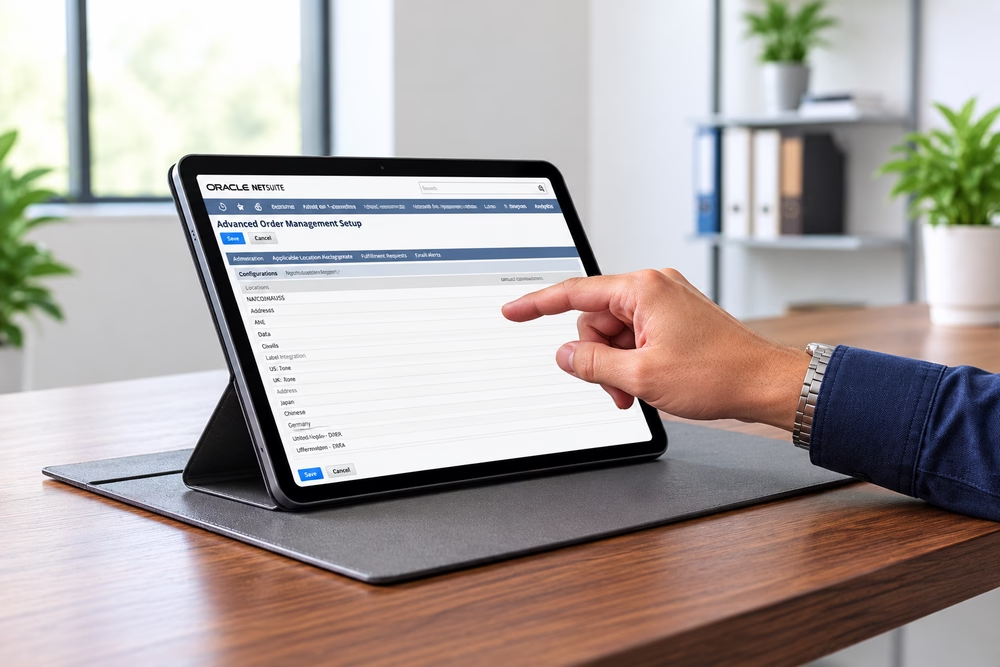
The NetSuite Advanced Order Management module picks the best location to fulfill each order line and releases it for fulfillment automatically, so every order ships from the right place. It builds on standard NetSuite order management, with 5,000 automated sales orders a year included. We help businesses across the US and the UK set it up across warehouses, stores, and channels.

NetSuite Advanced Order Management

Our NetSuite Consultant's Certifications

Oracle NetSuite Certified-SuiteFoundation
Oracle NetSuite Certified-ERP Consultant
Oracle NetSuite Certified-SuiteCloud Developer II
Oracle NetSuite Certified-SuiteCommerce Developer
Oracle NetSuite Certified-Administrator
What Is NetSuite Advanced Order Management?

What Is NetSuite Advanced Order Management?

The NetSuite Advanced Order Management module adds allocation orchestration to NetSuite order management. It automates how orders are promised, allocated, released, and fulfilled, so you can choose where each order ships from based on your global inventory and your own business rules.

It builds on standard order management, locations, and multi-location inventory. Automatic Location Assignment chooses a fulfillment location for each order line, and Fulfillment Requests release that line to the warehouse, store, or third-party logistics partner. Store Pickup is a separate feature that works alongside it. Every account includes 5,000 automated sales orders a year, and more capacity can be bought as an add-on.

How NetSuite Advanced Order Management Benefits Your Business

The NetSuite Advanced Order Management module turns fulfillment decisions into rules that run on every order, across every channel.

Happier Omnichannel Customers

Happier Omnichannel Customers

Offer prompt delivery and the fulfillment options shoppers want, from shipping to store pickup.
Save the Sale

Save the Sale

Fulfill from wherever you hold inventory, including your stores, instead of losing the order.
Better Inventory Turns

Better Inventory Turns

Fulfill to meet demand while preserving safety stock.
Scale Without Adding Headcount

Scale Without Adding Headcount

Automate routine fulfillment and manage only the exceptions.
Lower Fulfillment Costs

Lower Fulfillment Costs

Choose rules that reduce costs, speed up delivery, or balance both.
Room to Adapt

Room to Adapt

Deploy quickly and adjust rules as your market and business change.

NetSuite Advanced Order Management Features

The NetSuite Advanced Order Management module covers sourcing, release, store fulfillment, and exceptions in one rules-based process.

Automatic Location Assignment

Automatic Location Assignment

Choose the fulfillment location for each order line based on items, location type, distance, and available inventory.
Fulfillment Strategies

Fulfillment Strategies

Set each rule to minimize fulfillment locations, use the closest location, or use the highest-ranked location, and use regions to limit where a location can ship.
Rule Order and Triggers

Rule Order and Triggers

Run rules in a set order on events such as sales order approval or payment hold release, with separate configurations for each subsidiary in OneWorld.
Release for Fulfillment

Release for Fulfillment

Create fulfillment requests automatically and notify each location which orders to fulfill, with full visibility into released orders, status, and exceptions.
Ship From Store

Ship From Store

Turn stores into fulfillment locations, choose which stores and items take part, and manage store capacity and inventory buffers.
Store Pickup

Store Pickup

Support pickup and mixed orders, create pickup requests automatically, and notify customers when their order is ready.
Exception Management

Exception Management

Handle most order exceptions automatically, flag inventory discrepancies, and track custom exception reasons.
Backorder Rules

Backorder Rules

Decide what happens to order lines no location can fill.
Order Management Insight and KPIs

Order Management Insight and KPIs

Report on fulfillment requests, build saved searches and alerts, and track performance from allocation through fulfillment and returns.

Common Order Fulfillment Challenges and How We Solve Them

Most teams look at Advanced Order Management when someone is still deciding by hand where each order ships from. These are the challenges we solve most often, with fulfillment rules that run on every order.

Manual Location Picking

Manual Location Picking

Staff choose a fulfillment location for each order. The module assigns locations automatically, and we turn your routing habits into ordered rules.
Costly Split Shipments

Costly Split Shipments

Orders ship from too many places. Fulfillment strategies can limit the number of locations, and we set limits that fit your margins.
Stores Left Out of Fulfillment

Stores Left Out of Fulfillment

Store inventory sits unused while online orders wait. Ship from store puts it to work, and we set which stores and items take part.
Pickup Orders Going Wrong

Pickup Orders Going Wrong

Pickup orders are missed or customers are not told. Store pickup creates requests and notifications automatically, and we configure the handoff.
Exceptions Piling Up

Exceptions Piling Up

Unfilled lines need manual follow-up. The module handles most exceptions automatically, and we set backorder rules and exception reasons.
Locations Stuck After Rejections

Locations Stuck After Rejections

Old rejections leave items suspended at a location. We find and clear them and set up regular checks.

How We Implement NetSuite Advanced Order Management

Every project starts with where your orders ship from today, so the rules match your locations, channels, and customers.

Requirements and Licensing Review

Requirements and Licensing Review

We map your locations, channels, and order volume, and check automation needs against your included capacity.

Data Preparation and Rule Design

Data Preparation and Rule Design

We clean up locations, types, regions, and postal codes, and design rules, strategies, and backorder rules.

Sandbox Configuration

Sandbox Configuration

We enable the features and build rules, fulfillment request settings, exception reasons, and pickup emails.

Workflow Testing

Workflow Testing

We test real scenarios, including split orders, rejections, payment holds, and pickup handoffs.

Training and Go-Live

Training and Go-Live

We train order desk, warehouse, and store staff, then switch on automation in production.

Support and Tuning

Support and Tuning

We support your first weeks of live orders, then tune rule order, strategies, and capacity.

NetSuite Advanced Order Management Pricing

Order fulfillment automation is billed by the number of automated sales orders, and setup is a one-time project. What you pay depends on a few factors.

Automation Capacity

Automation Capacity

Every account includes 5,000 automated sales orders a year. Extra capacity is an add-on, bought in blocks through NetSuite, and unused capacity does not roll over.
Locations and Channels

Locations and Channels

The number of fulfillment locations, rules, and sales channels shapes the setup scope.
Store Fulfillment

Store Fulfillment

Adding ship from store or store pickup adds location setup, notifications, and staff training.

We scope your setup around where your orders ship from today, so you get a clear estimate before any work begins.

How Versich Delivers Advanced Order Management

Whether you are new to NetSuite or already running it, we start from how your orders are fulfilled today.

Area

New to NetSuite

Already on NetSuite

What must be in place first
Items, locations, and multi-location inventory set up as part of the core NetSuite rollout
Live locations and inventory, checked to make sure they are complete enough to automate
Main focus
Designing fulfillment rules alongside the rest of the NetSuite setup
Turning the routing habits your team already follows into rules, and clearing suspended item and location combinations
Biggest risk we manage
Building rules before location and inventory data is settled
Switching on automation for live orders without disrupting fulfillment
How we phase it
Go live with core order management first, then switch on automation once orders flow
Start automation with one channel or location, then extend it
Capacity check
Estimate automated order volume against the 5,000 included each year
Compare current order volume with the 5,000 included each year and plan extra capacity

What Our Clients Say About Our NetSuite Services

How NetSuite Advanced Order Management Works With Your Existing NetSuite Setup

Order allocation draws on your inventory, channels, and fulfillment partners. Here is how it connects to the rest of your NetSuite account, and what we set up so those connections work.

Inventory and Locations

Inventory and Locations

Location assignment reads available inventory across every location. We set up locations, types, and regions so the rules have accurate data.
Ecommerce, Marketplaces, and EDI

Ecommerce, Marketplaces, and EDI

Orders from storefronts, marketplaces, and EDI follow the same rules once they reach NetSuite. We connect your channels so every order is routed the same way.
Third-Party Logistics

Third-Party Logistics

Fulfillment requests can release order lines to a 3PL partner. We build the connection so requests and status updates flow both ways.
Reporting and Returns

Reporting and Returns

Fulfillment request data combines with sales order and return data. We build saved searches and alerts so your team sees exceptions early.

Explore Related NetSuite Modules

Advanced Order Management works alongside other NetSuite modules to extend your setup.

BLOGS & NEWS

Our Latest Blogs

25 Nov, 2026 by Mahendra Kumara S

NetSuite Next Rollout: What Changes, AI…

NetSuite Next is Oracle’s next generation of NetSuite, with AI built into its core. It started rolling out to US and Canadian accounts with the NetSui
Read More
25 Nov, 2026 by Versich Consultants

NetSuite Draft Status: Submit Transacti…

A NetSuite draft status means a transaction has been created but is not yet ready for final processing, posting, or payment. To submit a transaction f
Read More
25 Nov, 2026 by Shantanu

NetSuite OpenAir SuiteProjects Pro Guid…

NetSuite OpenAir SuiteProjects Pro is the current product relationship readers need to understand when evaluating NetSuite’s professional services aut
Read More
View More Blogs

Frequently Asked Questions

What is NetSuite Advanced Order Management?

It is a NetSuite module that automates order fulfillment. It assigns a fulfillment location to each order line using your rules and inventory, releases lines to warehouses, stores, or 3PLs, and handles store pickup and exceptions.

Is Advanced Order Management included with NetSuite?

Every NetSuite account includes 5,000 automated sales orders a year. If you automate more orders than that, you buy extra capacity through NetSuite.

What does Advanced Order Management require?

It builds on order management, locations, and multi-location inventory. You enable Automatic Location Assignment, Fulfillment Request, and Store Pickup as separate features.

How does it decide where to fulfill an order?

Rules run in a set order when an order is approved or a payment hold is released. Each rule uses a strategy, such as fewest locations, closest location, or highest-ranked location, and only considers locations with available inventory.

Can our stores ship orders or handle pickups?

Yes. Ship from store lets store staff accept, pick, and fulfill orders, and store pickup notifies customers when their order is ready. You choose which stores and items take part.

What happens when an order cannot be fulfilled?

The system tries to fulfill exception orders, then alerts the fulfillment manager or customer service. Backorder rules decide what happens to lines no location can fill.

Do you implement NetSuite Advanced Order Management for businesses in the United States?

Yes. We implement and support Advanced Order Management for businesses across the US and the UK, whether you are new to NetSuite or adding it to a live account.