A NetSuite integration project rarely fails because of a technical glitch; it usually breaks down long before go-live due to poor planning, unclear data ownership, weak “source of truth” decisions, and unresolved business process gaps.
At Versich, we’ve seen that the early warning signs appear during the planning and design stages, not in production. When integration isn’t treated as a strategic priority, businesses end up with disconnected workflows, inconsistent data, and costly rework after deployment.
Industry research shows that nearly 75% of ERP implementations face significant challenges, especially for organizations adopting ERP for the first time. This is critical because NetSuite implementations often coexist with existing systems, making integration the backbone that connects legacy processes, new workflows, and trusted business data.
That’s why a successful NetSuite implementation requires integration to be embedded from day one, not treated as a last-mile technical task after the system is configured.
In this guide, you’ll learn:
• Which NetSuite integration mistakes lead to avoidable go-live delays
• What key documents reveal gaps in architecture, data mapping, and testing
• How to minimize rework and ensure a smooth launch across systems
At Versich, we help businesses design, audit, and optimize NetSuite integrations with a focus on scalability, accuracy, and long-term performance. Connect with our experts to evaluate your integration architecture, data flow, and go-live readiness before hidden gaps turn into costly production issues.
TL;DR
|
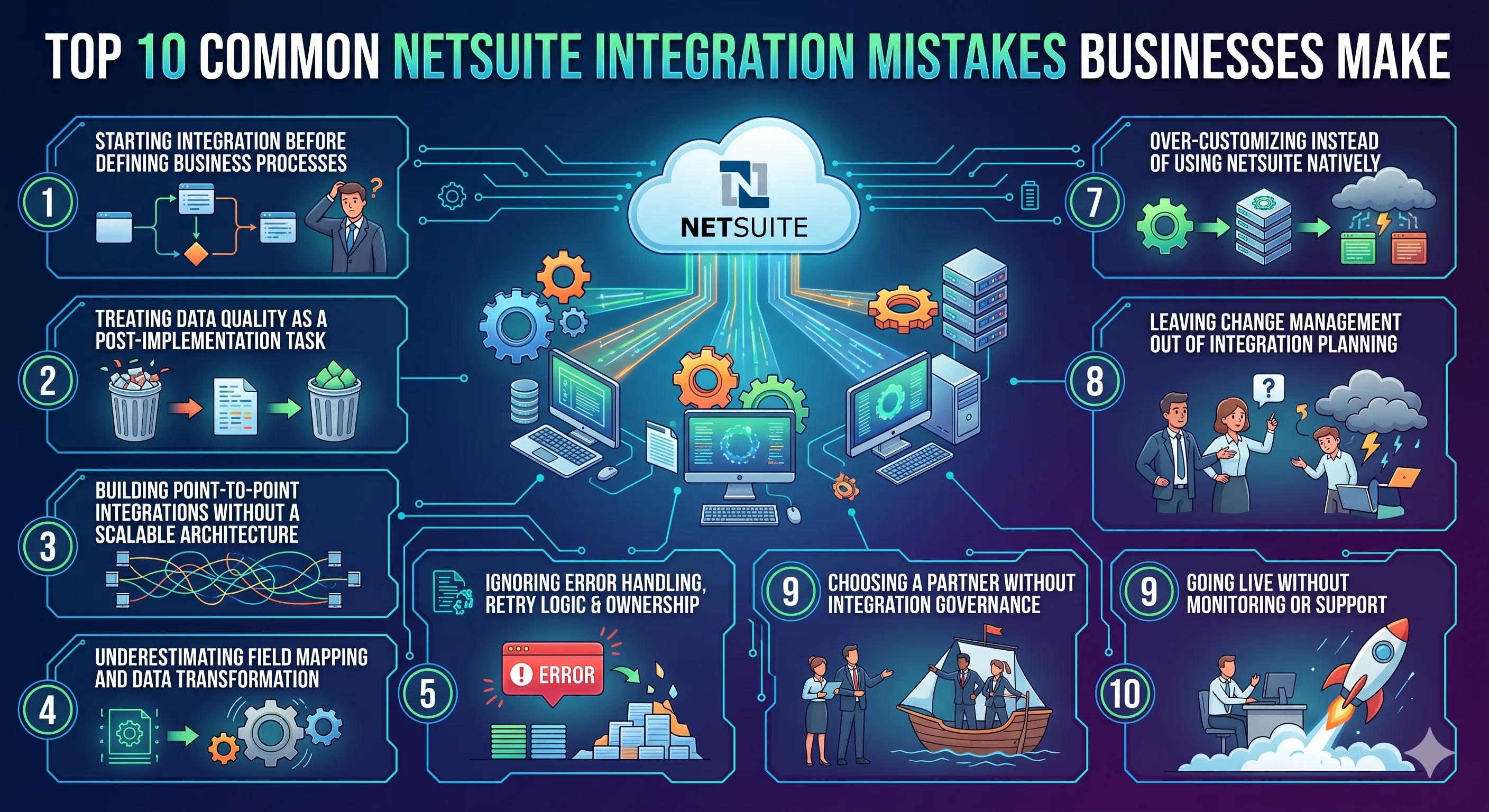
Top 10 Common NetSuite Integration Mistakes Businesses Make
Most NetSuite integration challenges don’t begin with technical failures; they stem from early decisions made during planning, design, and testing. Many teams prioritize connectors, APIs, or middleware tools, but overlook the critical business logic that must remain consistent across systems.
One of the biggest mistakes in ERP implementation is treating integration as just a technical layer, rather than a structured operating model that supports real business workflows.
At Versich, we focus on building integrations that go beyond connectivity. A successful NetSuite implementation requires a strong architectural foundation, clean and governed data, clearly defined ownership, thorough testing, and a long-term support strategy that extends well beyond go-live.
Without these elements in place, businesses often end up with a system that functions on the surface but relies heavily on manual workarounds, limiting efficiency, accuracy, and scalability.
#1) Starting Integration Before Defining Business Processes
One of the most common mistakes in a NetSuite implementation is beginning integration work without clearly mapping business processes. Teams often jump into selecting tools, defining endpoints, and building connections before understanding how core workflows, such as orders, invoicing, approvals, returns, procurement, or CRM handoffs, should actually function.
We see this lead to issues that appear technical but are rooted in poor planning. Without a defined process, there is no clear “source of truth,” resulting in duplicate entries, conflicting data, and misaligned workflows across systems.
For example, an order might be marked complete in an eCommerce platform, remain open in fulfillment, and post incorrect values in financials simply because each system operates on different assumptions.
A structured implementation approach should include a complete workflow map, defined ownership of each data object, approval hierarchies, exception scenarios, and clear system handoffs. This ensures NetSuite is aligned with actual business operations rather than replicating outdated inefficiencies in a new ERP environment.
#2) Treating Data Quality as a Post-Implementation Task
Data quality is not something to fix later; it’s a foundational input for successful NetSuite integration. When poor-quality data starts flowing between systems, every correction becomes complex, time-consuming, and prone to error.
Clear master data rules must define how customer, vendor, item, tax, and location records are created, updated, and governed. Without this clarity, duplicate and inconsistent data spreads quickly across systems.
Equally important is defining the migration scope early. Businesses must decide which historical data to migrate, what to archive, and what needs transformation. Delayed decisions here often disrupt testing cycles and delay go-live timelines.
Field completeness is another critical factor. Missing or inconsistent values, such as addresses, SKUs, or financial dimensions, lead to validation errors that appear as integration issues but originate from poor source data.
Finally, reconciliation methods must be established to validate data accuracy post-migration. Without clear benchmarks and checks, organizations cannot confidently trust their financial reporting.
NetSuite can enforce structure, but it cannot fix fundamentally flawed data. Clean, governed data is essential for a stable and scalable integration.
#3) Building Point-to-Point Integrations Without a Scalable Architecture
Point-to-point integrations may seem like a quick win, but they rarely scale. While connecting two systems directly might work for initial use cases, it quickly becomes complex as additional systems, such as CRM, eCommerce, procurement, logistics, and finance, are introduced.
Over time, this creates a fragile web of dependencies that is difficult to maintain, troubleshoot, or expand.
We focus on designing integration architectures that are scalable and future-ready. Businesses implementing NetSuite often continue to rely on multiple third-party systems, making a well-defined architecture critical.
For example, supply chain workflows require more than simple data transfers. They involve inventory timing, shipment tracking, backorder handling, procurement updates, and financial alignment, all of which must be orchestrated seamlessly.
A robust integration architecture should define:
- The use of middleware vs direct connections
- Data transformation ownership
- Workflow sequencing logic
- Error handling and retry mechanisms
- Monitoring and scalability considerations
Without this foundation, integrations may work initially but fail under growth and complexity.
#4) Underestimating Field Mapping and Data Transformation
Many integration failures stem from oversimplified field mapping. While teams may agree on syncing data between systems, the real complexity lies in how that data is interpreted, transformed, and validated.
We treat field mapping as a critical design phase, not a documentation task.
It’s not enough to map source fields to destination fields. Businesses must define:
- Status logic and lifecycle transitions
- Units of measure and pricing structures
- Tax rules and financial dimensions
- Data validation and transformation logic
If these elements are not clearly defined, transactions may sync successfully but still produce incorrect outcomes in NetSuite, resulting in reporting issues, operational confusion, and a loss of trust in the system.
Data Area | What Must Be Defined | How To Verify It | What Breaks If It Is Missed |
Customer Records | Ownership for names, terms, addresses, tax flags, and status values | Review field mapping sheet, create/update rules, and duplicate prevention logic | CRM and NetSuite hold conflicting customer profiles, and billing errors increase |
Item And SKU Data | SKU structure, units, pricing logic, inactive rules, and inventory location behavior | Compare source records to NetSuite item setup and mock sync output | Orders fail, inventory is misread, and procurement planning becomes unreliable |
Order Status Values | Exact translation of pending, approved, shipped, canceled, and returned states | Run scenario tests on status changes from source to destination | Workflow automation fires at the wrong time, and users lose trust in the order lifecycle |
Tax And Payment Terms | Tax codes, nexus logic, payment terms, and settlement handling | Reconcile sample transactions from the source through the invoice output | Financials and customer invoices do not align, which creates reporting and collections risk |
Department, Class, And Location | Financial dimensions used in NetSuite for reporting and control | Compare transaction postings to expected financial reporting output | Revenue, cost, and margin analysis become hard to trust after go-live |
Dates And Time Zones | Transaction dates, fulfillment timestamps, and posting periods | Validate event timing in the sandbox across systems | Transactions are posted in the wrong period, and operational workflow timing becomes inconsistent |
A complete mapping framework ensures data behaves consistently across systems, supporting accurate reporting, automation, and decision-making.
#5) Ignoring Error Handling, Retry Logic & Ownership
A strong integration isn’t one that never fails; it fails predictably, transparently, and recoverably. We treat error handling as a core design layer, not an afterthought.
When retry logic, error queues, and ownership are missing, failures don’t disappear; they get buried. A failed purchase order, a broken return flow, or an interrupted payment sync can quietly disrupt operations while teams pass responsibility between IT, operations, and finance.
A well-structured integration should clearly define:
- Which errors auto-retry vs. require intervention
- Who gets notified and when
- How root causes are tracked
- How corrected data is reprocessed
Without this framework, issues are only discovered after business impact when it’s already too late.
#6) Over-Customizing Instead of Using NetSuite Natively
Over-customization often starts with good intentions, replicating existing workflows or preferences. But when every legacy process becomes a customization request, complexity grows fast.
At Versich, the approach is simple: configure first, customize only when necessary.
Uncontrolled customization leads to:
- Higher implementation and testing costs
- Difficult upgrades and maintenance
- Increased integration complexity
The smarter approach includes:
- Leveraging native NetSuite features (fields, workflows, roles)
- Validating the business value of every customization
- Evaluating downstream integration impact
- Classifying requests into configuration, workflow, or custom build
This ensures the system remains scalable, maintainable, and future-ready.
#7) Testing Only Ideal Scenarios Before Go-Live
Testing only “happy paths” creates a false sense of readiness. Real business environments are messy, data is incomplete, processes break, and exceptions happen daily.
A reliable integration must handle:
- Missing or incorrect data
- Duplicate or delayed transactions
- Partial shipments and cancellations
- Period-end financial conditions
At Versich, testing is built around real-world scenarios, not demos.
If there’s no:
- Signed test evidence
- Defect tracking
- Data reconciliation validation
Then the system isn’t ready; it’s just untested under pressure.
Test Scenario | Evidence Required | Sign-Off Owner | Production Risk If Skipped |
Duplicate Customer Or Order Submission | Duplicate handling logic, merge rules, and queue behavior | Business owner and integration lead | Duplicate records distort reporting, fulfillment, and collections |
Partial Shipment Or Split Fulfillment | Order updates, inventory relief, and invoice timing validation | Operations lead and finance owner | Orders close incorrectly, and revenue timing becomes inconsistent |
Return, Credit, Or Cancellation | Reverse flow logic, status mapping, and financial reversal checks | Finance owner and customer operations lead | Refunds, credits, and stock movement diverge across systems |
Missing Required Source Data | Validation rule output, alerting, and manual correction path | Data owner and functional lead | Records fail silently or users start bypassing the workflow |
Delayed Third-Party Response | Retry behavior, timeout logic, and queue monitoring | Technical lead and partner delivery lead | Automation appears complete while transactions remain stuck |
Period-End Financial Posting | Posting period behavior, class-location mapping, and reconciliation results | Controller or finance lead | Financial reporting cannot be trusted during close |
Sandbox-To-Production Promotion | Deployment checklist, configuration comparison, and rollback plan | Project lead and system owner | Tested logic differs from production behavior at go-live |
A NetSuite sandbox is valuable only when the test cases reflect real business conditions. If the team cannot show signed test scripts, defect status, and reconciliation evidence, the project is not demonstrating readiness. It is demonstrating optimism.
#8) Leaving Change Management Out of Integration Planning
Even when systems stay the same, processes change, and that’s where most failures happen.
Without clear communication and training:
- Teams don’t know who owns what
- Errors go unresolved
- Users lose trust in the system
This is common in ERP projects that focus heavily on technical delivery but overlook people and processes.
A strong change management approach should:
- Define role-based responsibilities
- Train teams on new workflows and exception handling
- Align system changes with business impact
We ensure every team, from sales to finance, understands how integration impacts their daily work before go-live.
#9) Choosing a Partner Without Integration Governance
Not all NetSuite partners operate with structured governance, and that’s where projects start drifting.
A reliable implementation partner should provide:
- Clear project plans and control frameworks
- Mapping templates and test documentation
- Defined ownership and approval processes
- Transparent scope and commercial boundaries
Without this, projects often face:
- Scope creep
- Delays and rework
- Uncontrolled costs
At Versich, governance is built into every stage, ensuring clarity, accountability, and predictable delivery.
#10) Going Live Without Monitoring or Support
Go-live is not the finish line; it’s the beginning of real operations.
Without monitoring and support:
- Errors go unnoticed
- Data inconsistencies grow
- Teams react instead of proactively managing issues
A strong post-go-live model includes:
- Defined success metrics (sync rates, error volumes, latency)
- Clear ownership of monitoring and escalation
- Real-time visibility into failures and queues
- Structured support and response processes
We ensure integrations are not just launched but continuously optimized.
Future-ready integrations also require:
- Scalable support models
- Flexibility for new systems and workflows
- Clear documentation and reusable processes
Because long-term success depends on adaptability, not just implementation.
How Versich Audits NetSuite Integration Readiness Before Go-Live
Avoiding mistakes is only half the job; true success comes from proving that your NetSuite integration is fully ready for go-live. At Versich, readiness is not assumed; it is validated through structured documentation, clear ownership, rigorous testing, and well-defined release criteria.
If the right artifacts are missing or unclear, even a well-built integration can fail under real business conditions. That’s why a Versich-led readiness audit focuses on ensuring your integration performs reliably in production, not just within a project plan.
Essential Integration Documents & Proof Points
At Versich, every NetSuite integration is backed by documentation that demonstrates how the solution was designed, tested, and prepared for long-term success.
Interface Inventory
We document every integration touchpoint, source systems, target systems, sync frequency, triggers, ownership, and dependencies, giving complete visibility into your ecosystem and eliminating blind spots.
Field Mapping Framework
Our mapping goes beyond simple field matching. We define transformations, validation rules, default values, and ownership to ensure data behaves correctly across systems and maintains financial accuracy.
Test Validation & Evidence
Versich ensures integrations are tested against real-world scenarios, not just ideal cases. This includes signed test scripts, defect tracking, exception scenarios, reconciliation checks, and business approvals.
Cutover & Go-Live Strategy
We create a detailed go-live plan covering data migration timing, freeze windows, rollback strategies, and stakeholder approvals so launch is controlled, not rushed.
Support Handoff & Monitoring Setup
Before go-live, we establish monitoring dashboards, error-handling workflows, escalation paths, and ownership structures, ensuring your team is fully prepared to manage the system post-launch.
Clear Ownership & Escalation Model
One of the biggest risks in ERP integration is unclear accountability. Versich eliminates this by defining:
- Business owners for process validation
- Technical owners for integration performance
- Support owners for post-go-live issue resolution
We also implement structured escalation paths, severity levels, and response timelines. This ensures that any issue, no matter how small, is resolved quickly and does not disrupt operations.
For businesses needing deeper validation, Versich also offers a NetSuite Health Check to identify performance gaps, configuration risks, and security concerns before they impact your go-live.
Go-Live Readiness & Phased Rollout Strategy
At Versich, go-live is a decision based on data, not deadlines.
We define clear readiness thresholds, including:
- Acceptable defect levels
- Data reconciliation accuracy
- Business user readiness
- Monitoring and alerting setup
Readiness Area | What Good Looks Like | Verification Method | Next Step if Not Ready |
Open Defects | Only low-severity defects remain, each with a documented workaround, owner, and target resolution plan | Review the defect log by severity, business impact, and unresolved dependency | Delay launch or remove the affected scope from the initial release |
Data Reconciliation | Converted balances and synced transactions fall within predefined and approved tolerance levels | Compare mock conversion, reconciliation, and end-to-end test results against expected outcomes | Run another validation cycle before approving cutover |
Business Readiness | Critical users and process owners have completed role-based training and approved the updated workflow and exception process | Review training completion, process sign-off, and readiness approval from key business owners | Hold release until critical users and owners are trained and signed off |
Monitoring Setup | Alerts, logs, dashboards, queue visibility, and escalation procedures are in place for critical integration failures and exceptions | Validate the production monitoring and support checklist during the readiness review | Launch in phases or add support coverage before cutover |
Third-Party Dependency Stability | External vendors or platforms have completed required testing, confirmed dependency readiness, and aligned on cutover timing and support | Review vendor sign-off, test evidence, and cutover support confirmation | Pause release until dependency risk is resolved |
If these criteria are not met, we recommend delaying or adopting a phased rollout approach. This is especially critical for businesses with high transaction volumes, complex supply chains, or multiple third-party integrations.
Mistakes That Matter Most by Integration Scenario
Not all NetSuite integration mistakes carry the same level of impact. While a CRM sync issue may lead to data inconsistencies, errors in financial posting or supply chain timing can disrupt core business operations at scale.
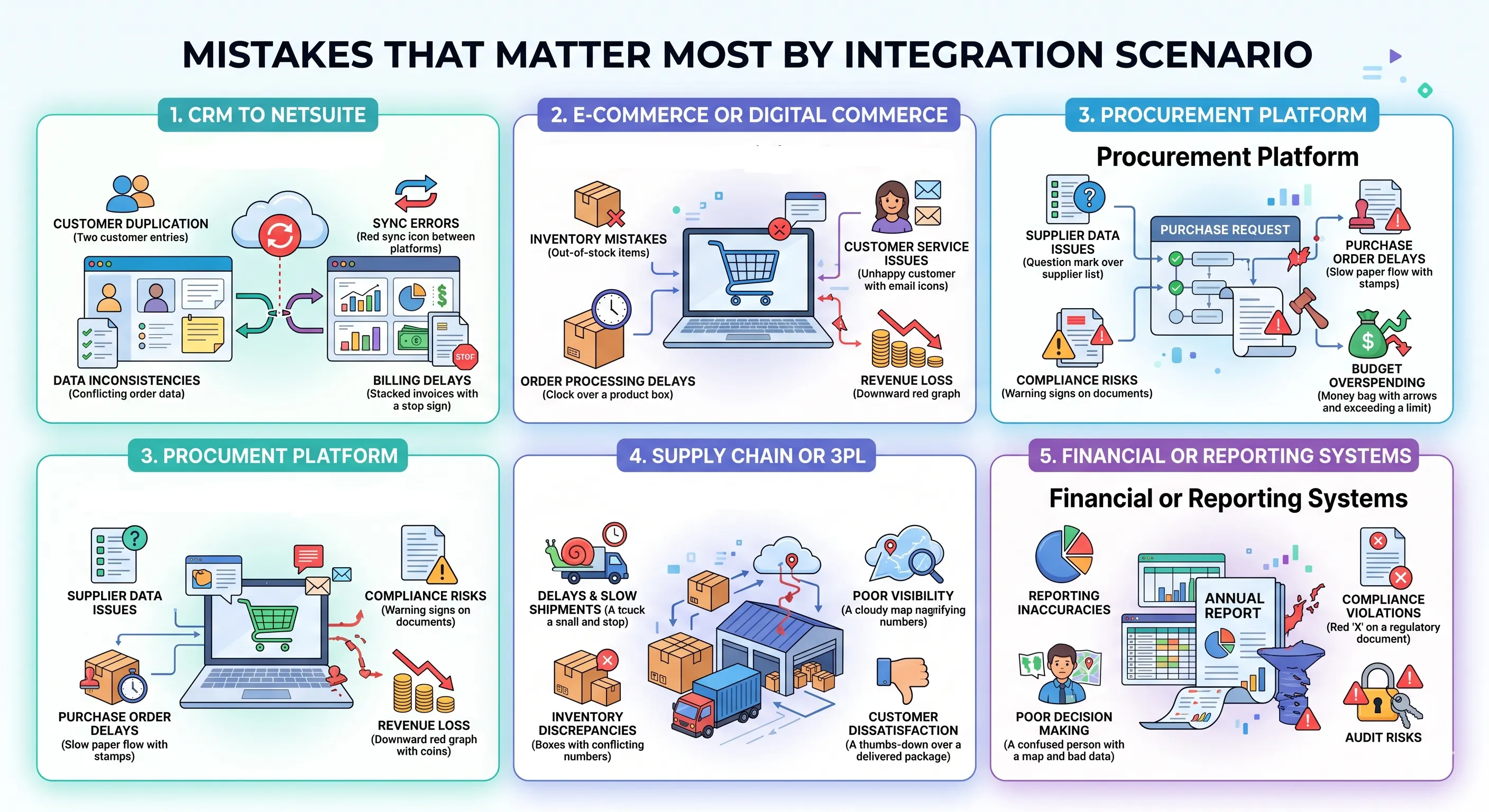
At Versich, we emphasize evaluating integrations based on real business impact, not just technical complexity. The true risk depends on transaction volume, system dependencies, and how quickly issues are identified and resolved. A strategic, scenario-based approach ensures that high-risk integrations receive the attention they require from the start.
Integration Scenario | Common High-Risk Failure Point | Likely Operational Consequence | What to Verify First |
CRM to NetSuite | Customer master ownership, duplicate handling, and field mapping gaps | Customer, sales, billing, or account data can diverge across systems | Customer master rules, field mapping, and duplicate-prevention logic |
E-commerce or digital commerce | Order lifecycle, pricing, tax, or fulfillment-status logic gaps | Orders and downstream fulfillment or tax handling can fall out of sync | Order lifecycle mapping, tax handling, and partial-fulfillment testing |
Procurement platform | Approval-state mapping, vendor-data ownership, or PO workflow gaps | Purchase requests and orders can stall, misroute, or require manual correction | Approval workflow, vendor master rules, and exception handling |
Supply chain or 3PL | Missing retry logic, timing mismatches, or weak exception handling | Inventory, shipment updates, and customer communication can become unreliable | Queue monitoring, timing tolerance, and backorder scenario testing |
Financial or reporting systems | Posting logic, segment mapping, accounting-period handling, or reconciliation gaps | Reporting accuracy and close processes can be disrupted | Posting validation, reconciliation rules, and period-end testing |
What a Controlled NetSuite Integration Looks Like
A successful NetSuite integration is not just about connecting systems; it’s about building a controlled, transparent, and scalable operating model.
At Versich, we ensure every integration is backed by:
- Clear documentation and architecture
- Defined workflows and ownership
- Real-time visibility into exceptions
- Thorough testing under real-world conditions
Every decision should be traceable, every failure visible, and every workflow validated before and after go-live.
Start with evidence:
Before launch, review key artifacts like the statement of work, interface inventory, field mapping documentation, test results, and support plans. These ensure your integration is not just built but fully validated and support-ready.
Close ownership gaps:
Assign clear business, technical, and escalation owners for each integration. This eliminates confusion, speeds up issue resolution, and ensures accountability across systems.
Protect your go-live:
For high-impact integrations, Versich recommends phased rollouts, defined reconciliation thresholds, and continuous monitoring. This reduces risk and ensures stability during critical business operations.
Why Choose Versich for NetSuite Integration?
At Versich, we go beyond implementation; we help you build a future-ready ERP ecosystem.
- Expert-led NetSuite integration strategy
- Strong focus on data accuracy and governance
- Scalable architecture for long-term growth
- Continuous monitoring and optimization
- Proven approach to reduce rework and go-live risks