Accounts payable is one of those functions that quietly determines how well a finance team actually runs. When it works, nobody notices. When it doesn't, the symptoms show up everywhere: late payments, strained vendor relationships, a month-end close that drags on for days, and a finance team buried in data entry instead of doing analysis that moves the business forward.
For organizations running Oracle NetSuite, the good news is that most of the manual pain in AP can be removed without bolting on a separate system or building a fragile web of custom code. NetSuite AP Automation brings invoice capture, purchase order matching, approval routing, payment, and reconciliation into one place, inside the ERP where your financial data already lives.
This guide explains exactly what NetSuite AP Automation is, the challenges it solves, how it works end to end, what it costs, where it falls short, and how it compares to the leading third-party alternatives. By the end, you'll have a clear, practical view of whether native NetSuite is enough for your organization or whether you should extend it, and how to get a fully automated, audit-ready AP process up and running.
What Is NetSuite AP Automation?
NetSuite AP Automation is a set of capabilities within the NetSuite ERP that automates the accounts payable process from the moment a vendor bill arrives to the moment it is paid and reconciled. Rather than keying invoices by hand, chasing approvers over email, and uploading payment files to a bank portal, finance teams let NetSuite handle the repetitive work: extracting invoice data, matching it to purchase orders and receipts, routing it for approval based on your rules, scheduling and executing payment, and recording everything to the general ledger.
The defining characteristic is that all of this happens inside NetSuite. Because the AP process runs in the same system as your general ledger, vendor records, and reporting, you get a single source of truth and a complete, time-stamped audit trail. There's no separate database to reconcile, no nightly sync to babysit, and no second login for the AP team. The result is real-time visibility into cash flow, outstanding liabilities, and vendor activity.
In practice, “NetSuite AP Automation” is not one single button or module. It's a combination of native features and optional add-ons that work together:
Bill Capture uses AI and optical character recognition (OCR) to read incoming invoices and pre-populate vendor bill records.
Approval workflows route bills to the right people based on amount, department, subsidiary, and other criteria.
Two-way and three-way matching compares bills against purchase orders and receiving records to catch discrepancies before money goes out.
Intelligent Payment Automation, powered by BILL, lets you pay vendors directly from NetSuite.
Dashboards and reporting give controllers a live view of AP aging, cash requirements, and approvals.
The screenshot below shows the Payment Automation overview in NetSuite, payables grouped by aging bucket (overdue, due within 7 days, due in 7+ days, and total bill balance), connected bank accounts, reminders for runs pending approval and outstanding checks, and an account register showing recent bill payments. This is the kind of single-pane-of-glass control that makes payables manageable instead of chaotic.
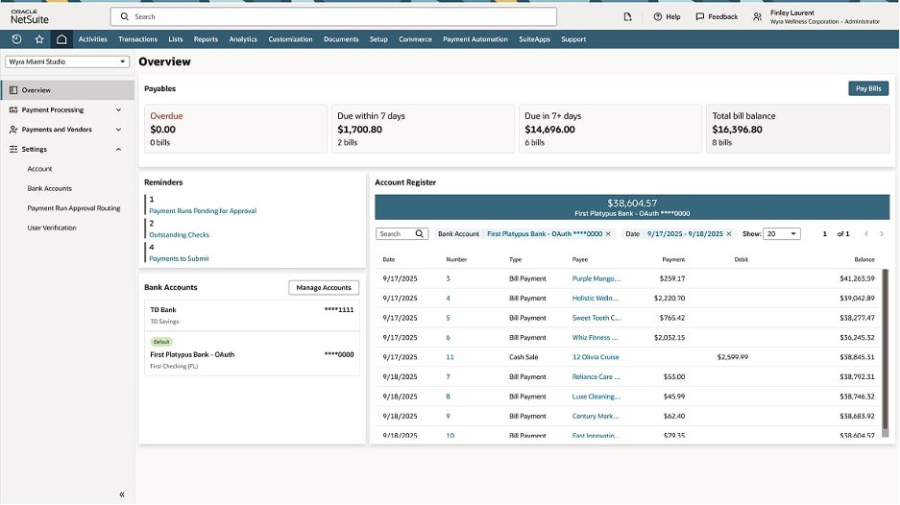
The NetSuite Payment Automation overview: payables by aging bucket, bank accounts, and a live account register.
If you're already on NetSuite and still processing AP largely by hand, you're leaving a meaningful amount of time, money, and control on the table. The rest of this guide breaks down exactly what's available and how to put it to work.
Challenges With Manual Accounts Payable
These are the challenges finance leaders consistently run into when AP is handled with spreadsheets, email, and bank portals.
Slow processing and long cycle times.
When every invoice is keyed by hand, coded manually, and chased through email for approval, processing time stretches from days into weeks. Industry benchmarks routinely show manual AP teams taking around two weeks to process a single invoice, while automated, best-in-class teams do it in a few days. Slow cycles mean missed early-payment discounts and a higher chance of late fees.
High cost per invoice.
Every manual touch, opening the email, typing the data, walking it to an approver, filing the paperwork adds labor cost. As invoice volume grows, manual AP forces you to add headcount just to keep pace, turning AP into a cost center that scales linearly with the business.
Data entry errors.
Manual keying introduces transposed numbers, wrong GL codes, duplicate entries, and mismatched vendor records. Each error has to be caught, investigated, and corrected, which consumes even more time and undermines the accuracy of your financials.
Duplicate and fraudulent payments.
Without systematic matching and controls, it's easy to pay the same invoice twice, especially in multi-subsidiary environments where the same bill can be entered under different entities. Manual processes also create openings for fraud: altered bank details, fake vendors, and unauthorized payments that slip through because there's no enforced approval trail.
Weak visibility.
When invoice data lives in inboxes, spreadsheets, and filing cabinets, no one has a real-time picture of what's owed, what's approved, and what's about to be paid. CFOs end up making cash decisions with stale, incomplete information.
Strained vendor relationships.
Late and unpredictable payments damage trust with the suppliers your business depends on. Vendors who aren't paid on time may tighten terms, deprioritize you, or stop extending credit altogether.
Painful audits and month-end close.
Manual AP leaves gaps in the audit trail. Reconciling payments to invoices to GL entries at close becomes a multi-day scramble of cross-referencing documents, and auditors ask questions that take hours to answer because the supporting evidence is scattered.
The common thread is that manual AP doesn't just slow you down; it limits how confidently you can manage cash, control spend, and scale. That's the gap NetSuite AP Automation is designed to close.
Challenges NetSuite Intelligent Payment Automation Solves
NetSuite Intelligent Payment Automation, the BILL-powered payment capability embedded in NetSuite, was built specifically to fix the back end of the AP process — the actual movement of money, which is often where the worst friction lives. Here's what it directly addresses.
Time-consuming, labor-intensive payment runs
Paying bills manually means assembling payment batches, generating files, logging into bank portals, and re-keying data. Intelligent Payment Automation lets you pay vendors in a single workflow directly inside NetSuite, with no extra logins and no manual keying into a separate banking interface.
Payment delays and poor vendor communication
Manual processes make it hard to pay on time and keep vendors informed. Automated payments with clear status tracking mean suppliers get paid on schedule and can see where their payment stands, which strengthens relationships and your standing as a customer.
Error-prone reconciliation
Matching payments back to bills and bank activity by hand is slow and mistake-prone. Because payments are initiated and recorded inside NetSuite, remittance data and transaction details flow back automatically, so bank reconciliation and GL entries happen with far less manual effort and a faster close.
Limited control and weak internal controls.
Manual payments often lack enforced, multi-level approval. Intelligent Payment Automation supports role-based, multilevel approval workflows, scheduled payments, and batch execution, so finance retains tight control over outgoing cash and who can authorize it.
Fraud and duplicate-payment risk
Centralizing payments in one auditable workflow, with approval routing and status visibility, reduces the openings for duplicate payments and fraudulent disbursements that manual, fragmented processes create.
Lack of cash visibility
Because everything runs in NetSuite, you get full visibility into payment runs, statuses, and cash position in real time, instead of piecing it together across systems.
In short, Intelligent Payment Automation turns what used to be a late-night, spreadsheet-and-bank-upload ritual into a controlled, single-workflow operation with end-to-end auditability without leaving the ERP.
The Core Components of NetSuite AP Automation
To understand how the pieces fit together, it's worth breaking down the native building blocks. Each one removes a specific category of manual work.
Bill Capture (OCR + AI)
Bill Capture is the front door of the process. Vendors email invoices to a dedicated address, or your team drags and drops PDFs and images directly into NetSuite. NetSuite then scans each document using AI/ML-based object detection and OCR, converting the contents into structured digital text. It automatically creates a vendor bill record and pre-populates fields such as vendor name, PO number, items, quantities, and pricing. Crucially, it learns from previous bills, so accuracy improves over time as it sees more of each vendor's invoice format. A side-by-side view of the original document next to the draft bill makes review and approval quick.
Recent releases have continued to extend Bill Capture. Enhancements introduced in the 2025.1 release include using linked purchase order data to populate applicable fields, aggregating multiple scanned item lines into a single line, allowing tax and shipping preferences to be left empty rather than requiring a selection, and lowering the permission threshold for creating bills via Bill Capture.
Approval Workflows
Once a bill exists in NetSuite, approval workflows automatically route it to the right stakeholders. Using NetSuite's workflow engine (SuiteFlow), you can define rules based on amount thresholds, department, subsidiary, vendor, GL account, and more. Approvers sign off with a click, and the system enforces that every required step is completed before a payment can be scheduled. This replaces the email back-and-forth and gives you an enforced, time-stamped approval trail for audit.
Two-Way and Three-Way Matching
Matching is where errors and overpayments get caught. Two-way matching compares the vendor bill against the purchase order. Three-way matching goes further, comparing the purchase order, the receiving record (item receipt), and the bill. If quantities or amounts don't line up — say you were billed for 100 units but only received 90 — the discrepancy is flagged before payment is released. Automated matching is one of the highest-value controls in the entire AP process because it directly prevents overpayment, duplicate payment, and payment of fraudulent bills.
Intelligent Payment Automation (Powered by BILL)
Intelligent Payment Automation handles the back end: actually paying the vendor. Announced as part of a strategic NetSuite and BILL partnership at SuiteWorld in October 2025, it lets you pay vendors directly within NetSuite using the BILL vendor network. Supported payment types include checks, ACH, and electronic forms such as virtual cards and wallet payments. You can configure role-based approvals, schedule payments, and run batch payments, then track every payment's status inside NetSuite. Remittance and transaction data flow back into NetSuite so reconciliation is largely automatic. The capability is available to organizations based in the U.S. with a valid U.S. address, or to global customers with U.S. business subsidiaries.
Dashboards and Reporting
Finally, AP-specific dashboards, KPIs, and reports give controllers and CFOs a live view of the procure-to-pay process, AP aging, outstanding checks, payment runs pending approval, cash position, and vendor activity. Because the data is native, reporting is real-time and audit-ready rather than assembled after the fact.
How Does Accounts Payable Automation Work in NetSuite?
It helps to walk the full lifecycle of an invoice through an automated NetSuite AP process, end to end. Here's what “touchless” or near-touchless processing looks like in practice.
Step 1 — Capture: A vendor emails an invoice to your designated Bill Capture address, or your team uploads it. NetSuite's OCR and AI read the document, extract the header and line-level details, and create a draft vendor bill with the fields pre-populated. Duplicate detection flags any invoice that looks like one already in the system.
Step 2 — Code and validate: The system applies GL coding based on the vendor, PO, and learned patterns from prior bills. Custom segments like subsidiary, department, project, and location are populated. The AP specialist reviews the draft against the side-by-side image rather than typing from scratch.
Step 3 — Match: NetSuite automatically matches the bill to its purchase order and, where applicable, the item receipt. Two-way and three-way matching confirm that what you're being billed for aligns with what you ordered and received. Exceptions, price variances, quantity mismatches, and missing receipts are surfaced for review.
Step 4 — Approve: The bill is routed through your approval workflow based on its attributes. Approvers receive notification and sign off with a click. The system blocks payment until all required approvals are complete, and it logs who approved what and when.
Step 5 — Pay: Once approved, the bill flows into a payment run. Using Intelligent Payment Automation, you select a payment method (ACH, check, or virtual card), schedule timing to optimize cash flow, and execute individually or in batches directly from NetSuite. Multilevel payment approvals add a final control before money leaves the bank.
Step 6 — Reconcile and report: Payment confirmations and remittance data flow back into NetSuite. GL entries are recorded automatically, bank reconciliation matches payments to bank activity, and dashboards update in real time. At month-end, the audit trail is already complete, no scramble required.
The term you'll often hear for the ideal end state is “touchless processing,” meaning no manual data entry is required at any stage, though approvers still click to sign off. The more standardized your vendors and the cleaner your master data, the higher your touchless rate.
Top Accounts Payable Tasks to Automate
Not every AP task delivers the same return when automated. If you're prioritizing, these are the tasks where automation pays off fastest and hardest.
Invoice data capture and entry. This is the single biggest source of manual labor and error. OCR and AI extraction eliminate keying and dramatically cut cycle time. Start here.
GL coding. Automatically assigning the right accounts and segments based on vendor history and PO data removes a slow, judgment-heavy step and improves consistency.
Purchase order matching. Two-way and three-way matching is high-value because it directly prevents overpayments and fraud. Automating it removes a tedious cross-referencing task and a major risk at once.
Approval routing. Rule-based routing ends the email chase, enforces policy, and speeds approvals. It also produces the audit trail you'll need at close.
Duplicate and exception detection. Flagging duplicate invoices, price variances, and suspicious vendor or bank-detail changes catches problems before money goes out.
Payment execution. Paying vendors directly from the ERP, with scheduling and batch runs, eliminates bank-portal re-keying and file uploads while tightening control over cash timing.
Payment reconciliation. Automatically matching payments back to bills and bank activity removes one of the most painful month-end tasks.
Reporting and analytics. Automated AP aging, cash-requirement, and spend reports replace manually built spreadsheets and give leadership real-time insight.
A practical rule of thumb: automate intake and matching first (the biggest labor and risk reduction), then payment and reconciliation (the biggest control and cash-management gains), then layer in analytics.
How Much Does NetSuite Intelligent Payment Automation Cost?
This is one of the most common questions, and the answer is refreshingly straightforward.
The SuiteApp itself is free to install. NetSuite Intelligent Payment Automation, powered by BILL, is a no-charge add-on module. There's no separate license fee to turn it on, and self-service signup means you can activate it and make your first payment quickly.
You pay per transaction through BILL. Because the payment processing runs on the BILL network, transaction charges from BILL apply to the payments you process. Published examples put an ACH or electronic payment at around $0.59 and a physical mailed check at around $1.99 per transaction. (Always confirm current rates with NetSuite and BILL, as fees can change.)
There may be an offset on card payments. Where eligible transactions are completed using a virtual credit card, those payments can earn rebates or credits, which offset some processing costs and is part of why finance teams increasingly treat AP as a potential source of value rather than purely a cost center.
Availability. Intelligent Payment Automation is available to organizations based in the U.S. with a valid U.S. address, or to global customers that have U.S. business subsidiaries.
It's worth separating this from the broader NetSuite cost model. A NetSuite subscription is an annual license made up of the core platform, optional modules, and the number of users. Some AP-related capabilities are native to your existing NetSuite accounting and don't carry an additional license cost, while certain advanced features and third-party SuiteApps are priced separately. Intelligent Payment Automation specifically follows the “free to install, pay-per-use” model described above.
The implication for budgeting: the entry cost to start automating payments inside NetSuite is low. The variable cost scales with how many payments you process and which payment rails you use, and electronic payments are far cheaper per transaction than mailed checks, which is one more reason to move vendors off paper.
How to Set Up NetSuite AP Automation
While exact steps vary by account and the SuiteApps you use, a typical setup follows this path. Doing it in order, and testing in a sandbox first, prevents most go-live headaches.
Enable the relevant features: Under Setup > Company > Enable Features, turn on the accounting and AP-related features you need, and confirm A/P is enabled along with related settings.
Install the SuiteApps: From the SuiteApp Marketplace, install the capabilities you'll use for example, Bill Capture and Intelligent Payment Automation. Complete any required signup or bank application steps, making sure your Company Information matches the details you submit.
Clean up vendor master data. Automation amplifies whatever data hygiene you start with. De-duplicate vendors, standardize names and addresses, and confirm payment details before going live. Messy vendor masters are the number-one cause of automation friction.
Define approval rules. Build approval matrices that mirror your actual org chart and policy by amount, department, subsidiary, and vendor. Keep them as simple as your controls allow.
Configure payment methods and bank accounts. Set up your payment rails (ACH, check, virtual card), default bank accounts per subsidiary, and the corresponding cash and AP accounts.
Sandbox test. Run representative invoices and payment scenarios, including exceptions like partial receipts and price variances, through the full workflow in a sandbox before deploying to production.
Train the team and roll out. AP automation changes how people work. Train AP staff and approvers, document the new process, and plan a phased rollout so issues surface early and trust builds.
Key Benefits of NetSuite AP Automation
Pulling it together, here's what organizations gain when AP automation is properly implemented in NetSuite.
Faster processing and shorter cycle times. Removing manual entry and email-based approvals compresses invoice processing from weeks to days, freeing the AP team to handle more volume without adding headcount.
Lower cost per invoice. Less manual labor per invoice means AP costs stop scaling linearly with growth. Electronic payments also cost far less per transaction than checks.
Fewer errors and duplicate payments. OCR with learned accuracy, automated matching, and duplicate detection sharply reduce data-entry mistakes and prevent paying the same bill twice.
Stronger fraud prevention and controls. Enforced, multilevel approvals, anomaly flagging, and secure vendor onboarding close the gaps that manual processes leave open.
Faster month-end close. Automated reconciliation and a complete, real-time audit trail eliminate the close-time scramble and make audits far less painful.
Real-time cash and liability visibility. Because everything runs in NetSuite, CFOs see what's owed, approved, and about to be paid in real time enabling better cash decisions and payment timing.
Better vendor relationships. Paying on time, every time, with clear status updates strengthens trust with the suppliers your business depends on.
Scalability for complex organizations. Native multi-entity and multi-currency support means the process scales cleanly across subsidiaries a major advantage for NetSuite OneWorld customers.
A single source of truth. No separate AP database, no nightly syncs to reconcile, no second login. Everything lives where your financials already are.
The strategic payoff is that AP shifts from a back-office cost center into a controlled, data-rich function that contributes to cash management, spend control, and faster, more confident financial reporting.
Where Native NetSuite AP Automation Falls Short
An honest assessment matters because native NetSuite isn't the right fit for every organization, and knowing the limits up front saves you from a frustrating implementation.
OCR struggles with difficult documents. Native Bill Capture performs best on clean, conventional, English-language invoices. Poor scans, non-standard layouts, and non-English documents produce more exceptions and corrections.
Workflow gaps on partial receipts. Native matching can stall when a PO is only partially received, sometimes forcing manual workarounds or bill splitting.
Complex approvals may require scripting. Highly conditional approval scenarios can require SuiteFlow configuration or scripting, which means involving IT or a developer rather than finance owning the rules entirely.
Duplicate-supplier and duplicate-invoice risk. In multi-subsidiary environments, it's still relatively easy to create duplicate suppliers or post the same invoice under different entities without additional controls.
Limited touchless throughput and advanced analytics. Native tools are built for solid OCR and approvals rather than the highest-end touchless processing rates, deep exception handling, and advanced spend analytics that some high-volume teams need.
Setup requires clean data and, often, expertise. Even with self-service signup, organizations with messy vendor masters or complex requirements typically need help with the initial configuration and change management.
None of this means native NetSuite is the wrong choice for low-to-moderate volume with standardized vendors; it's often exactly right. But high-volume, global, or complex organizations frequently extend NetSuite with a specialized solution, which brings us to the alternatives.
NetSuite AP Automation Alternatives
When native capabilities don't fully meet the need, a number of strong third-party platforms extend or replace parts of the NetSuite AP process. Here's an honest look at the leading options.
Medius
Medius offers an autonomous, AI-driven AP automation suite that spans procurement, invoice capture, AP automation, payments, and expenses. It's a SuiteApp-certified NetSuite partner and has been positioned by Gartner as a Leader in the Magic Quadrant for Accounts Payable Applications. Medius is known for very high touchless processing rates on PO invoices, strong fraud and anomaly detection, e-invoicing and tax compliance across many countries, and pre-built connectors that enable relatively fast deployment. It's a strong fit for mid-market and larger organizations that want a mature, analyst-recognized platform and global reach.
Tipalti
Tipalti focuses on end-to-end global payables automation, with particular strength in mass and cross-border payments. It handles invoice capture with OCR, approval workflows, supplier management and onboarding, tax and regulatory compliance, and global payment execution across many countries and currencies. Tipalti is a common choice for businesses with international supplier bases and complex global payment and compliance requirements that go beyond what domestic-focused tools cover.
Charted
Charted is a NetSuite-native AP automation provider whose invoice, approval, and payment automation lives directly inside NetSuite as a SuiteApp, with no middleware or external syncing. It emphasizes AI-powered capture, expense accrual automation, complex multi-entity and multi-currency approval workflows, built-in duplicate and fraud controls, and payment execution (ACH, wires, checks) without leaving NetSuite. Approvers can sign off from email without needing NetSuite licenses. Charted positions itself as a one-stop NetSuite shop, combining consulting expertise with native AP tooling, and is a good fit for teams that want to avoid integration overhead entirely.
Paystand
Paystand is a Built for NetSuite SuiteApp that automates both AR and AP natively, with two-way data sync. Its differentiator is a B2B payment network with a fee-less payment rail designed to cut transaction costs, alongside customizable approval policies and full audit trails. Paystand appeals to organizations focused on reducing payment-processing fees and managing receivables and payables on one platform.
Ramp
Ramp combines corporate cards and spend management with Ramp Bill Pay, offering AI-powered line-level OCR, automatic bill coding, two-way bill and PO sync with NetSuite, automated three-way matching through Ramp Procurement, multi-entity support, and AP aging reporting. Ramp is popular with fast-growing companies that want spend control, cards, and AP automation in one modern interface, with payments executed through Ramp. Notably, Ramp is also a common component in tri-system procure-to-pay architectures alongside NetSuite.
Zone & Co (ZoneCapture)
Zone & Co provides SuiteApps, including ZoneCapture, that extend native NetSuite AP with enhanced data capture, streamlined approvals, and exception handling that runs inside the ERP. Because it works where your team already works, it keeps the AP workflow within NetSuite while adding capabilities like better extraction and tighter exception management. It's well-suited to NetSuite-committed organizations that want to strengthen the native process without moving to an external platform.
BILL
BILL (formerly Bill.com) is a financial operations platform for small and midsize businesses and is the engine behind NetSuite's own Intelligent Payment Automation. Beyond that embedded capability, BILL offers its own AP automation with invoice capture, approval workflows, and a large vendor payment network supporting ACH, checks, and virtual cards. For NetSuite customers, the most seamless way to use BILL is through the native Intelligent Payment Automation module described earlier, which delivers BILL's payment network without leaving the ERP.
Why Versich Is the Right Choice for NetSuite AP Automation
Choosing and configuring AP automation is one decision; making it actually work in your environment is another. Versich is a NetSuite consulting and Managed services firm that specializes in exactly this kind of work and brings a few things that make the difference between a tool you've turned on and a process that genuinely runs itself.
Deep NetSuite and SuiteScript expertise. Versich's team combines NetSuite administration, SuiteScript development, and ERP consulting across industries. That means we can do more than flip on Bill Capture; we can build the custom workflows, validations, and automations that handle your real-world exceptions, from partial receipts to complex multi-entity approvals.
Integration is our core strength. When native NetSuite isn't enough, and you need to connect a best-of-breed platform - Ramp, BILL, Tipalti, Medius, and others clean, reliable integration is what separates success from frustration. We build and manage iPaaS integrations across Boomi, Celigo, MuleSoft, Workato, and Jitterbit, so vendors, purchase orders, bills, payment status, and GL entries flow accurately between systems. We've done the multi-system procure-to-pay architecture work, including tri-system flows connecting NetSuite, Ramp, and other platforms.
Objective, vendor-neutral guidance. Because Versich isn't selling a single AP product, our recommendation is based on your volume, complexity, and goals, not on what we're trying to license to you. If native NetSuite plus Intelligent Payment Automation is the right answer, we'll tell you. If you need to extend it, we'll help you pick and implement the right platform.
End-to-end delivery and managed services. From the initial AP assessment through implementation, custom development, integration, and ongoing managed services, Versich supports the full lifecycle. After go-live, we keep the process running, handle enhancements, and adapt as your business and NetSuite releases evolve.
Three-way match and procurement depth. AP automation is only as good as the procurement data behind it. Our experience with item master builds, three-way match enablement, and procure-to-pay design means we automate AP in a way that holds up against real purchasing complexity, not just clean textbook invoices.
If you're on NetSuite and want AP that's fast, controlled, and audit-ready, whether that's native automation, an extended SuiteApp, or an integrated best-of-breed platform, Versich can assess your process, design the right solution, and deliver it.
Final Thoughts
NetSuite AP Automation gives finance teams a path out of manual, error-prone accounts payable and into a fast, controlled, fully auditable process without leaving the ERP. Native Bill Capture, approval workflows, and matching handle the core, while Intelligent Payment Automation (powered by BILL) closes the loop on payments at a low entry cost. For higher volume, global complexity, or maximum touchless processing, a strong ecosystem of alternatives — Medius, Tipalti, Charted, Paystand, Ramp, Zone & Co, and BILL can extend or replace parts of the process.
The decision isn't really “native versus third-party.” It's about matching the solution to your volume, complexity, and goals, and then implementing it with clean data, well-designed workflows, and reliable integration. Get that right, and AP stops being a cost center you tolerate and becomes a controlled, real-time function that strengthens cash management, sharpens reporting, and improves vendor relationships.