MVP Nomination App in Power Apps to Celebrate Best Performing Employee Every Month

Microsoft 365 Native
No additional tools required

Real Time
Leadership Dashboard

3 Clicks
Complete a nomination in 3 clicks

365 Days
Recognition History Retained
The client A US based Consulting Company have a growing team of Data Analyst, Consultants and Engineers. As more people joined, the employee recognition process hadn't kept pace. Most recognition happened through quick shoutouts during meetings, which meant great work was often forgotten after a few days.
They wanted a simple system where colleagues could nominate each other, track the monthly leaderboard, and look back at previous winners. Most importantly, it needed to be fair and easy for everyone to use.
To solve this, we built a Power Apps nomination app using SharePoint as the backend. Since the client already had Microsoft 365 in their enterprise stack, there were no additional licensing costs, and the solution fit seamlessly into their existing environment.
The App has five Canvas and each one does a specific job. SharePoint sits behind everything storing employee profiles, nominations, vote counts, and past MVP records. Here is how it all works.

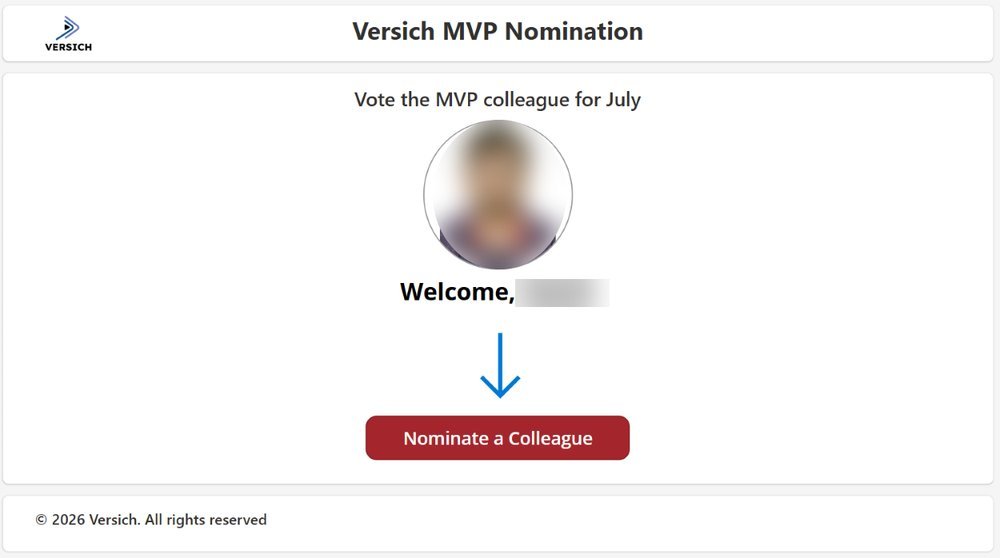
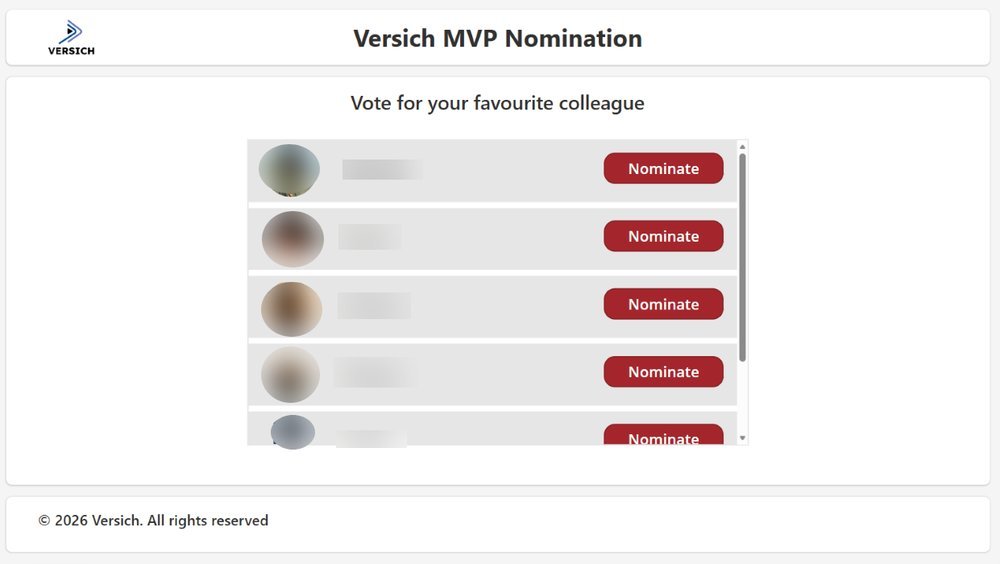
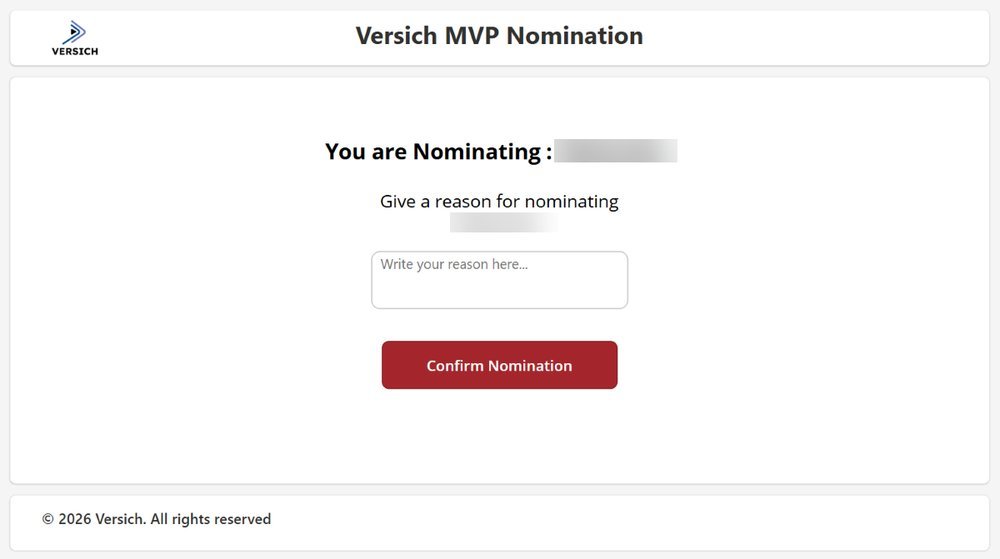
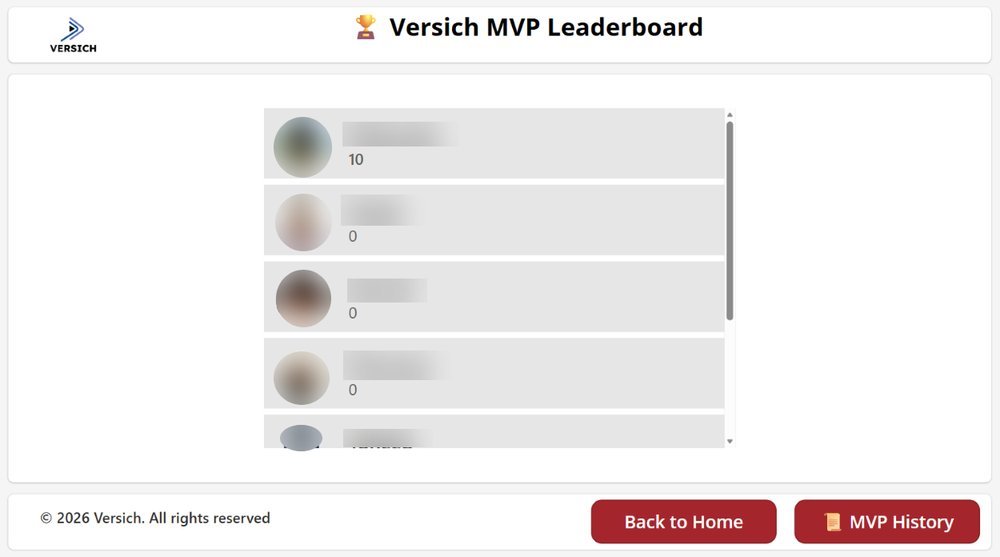
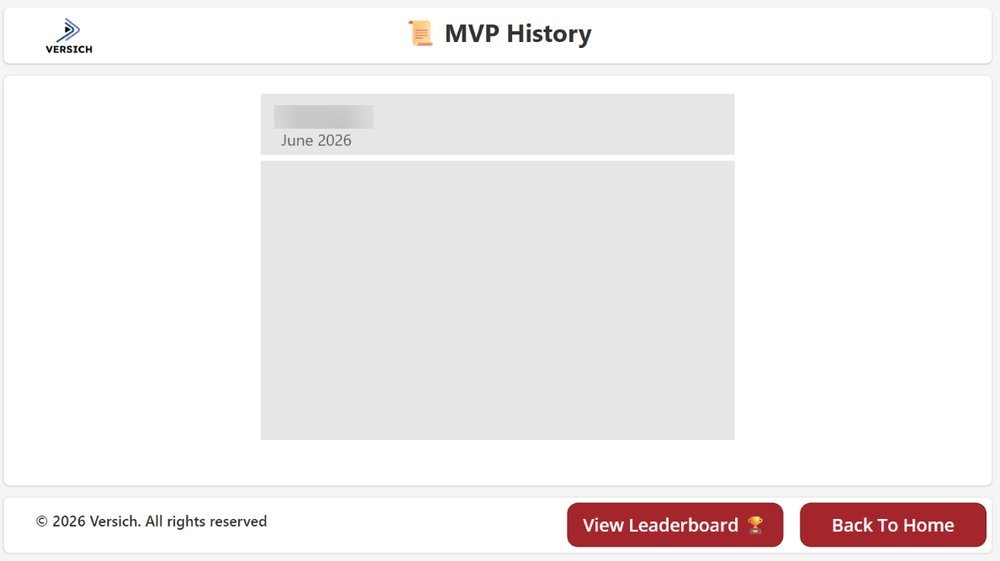
The client went from a vague, informal recognition culture to something everyone can actually participate in. People can nominate, watch the leaderboard, and see the history. The new process provides a consistent and transparent way for employees to recognize one another every month.

The app created a more engaging recognition culture by making appreciation visible, structured, and continuous. Instead of recognition happening only in meetings or private chats, employees now have a central place to celebrate colleagues’ contributions every month. This helps build a stronger team culture, encourages positive peer-to-peer recognition, and makes employees feel more valued across the business.

As employees can be nominated based on their impact, it motivates employees to increase productivity, ship updates that drives the business in a positive direction and their hardwork isn’t going unnoticed by their colleagues, team and the business.

The one-vote rule is enforced by both the application logic and the underlying SharePoint data, ensuring every nomination is valid. Every nomination that goes in is logged with a timestamp in SharePoint.

We built this entirely using tools the client already had - Power Apps and SharePoint. No new subscriptions, no vendor negotiations. It cost us nothing extra to run.

Every vote and every monthly winner is saved in SharePoint permanently. Over time, this creates a valuable recognition history that managers can use during performance reviews and reward discussions. It also helps identify employees who are consistently recognized by their peers.

The team asked questions nobody else had. They understood our approval process and recommended a setup that fit it, rather than forcing us into a template.

Our upgrade kept getting pushed back because nobody knew what our custom modules would break. The assessment listed every dependency and showed us what to keep, adapt, or drop before we touched anything.
Procurement and inventory were handled in three different places. The roadmap they gave us was practical and in the right order, and it was clear what could wait.
We came in unsure whether Odoo suited a school our size. The consultants looked at how we handle fees, purchasing, and staff records and told us plainly what Odoo would cover and what it wouldn't. That honesty made the decision easy.

We were already on Odoo and struggling with reports nobody trusted. The assessment pinpointed what to fix through configuration and what needed development. It saved us from rebuilding everything.
Our sales and warehouse teams were working from different spreadsheets. The consultants mapped how orders actually moved and gave us a roadmap we could follow, step by step.
We thought we needed heavy customization. Versich showed us that most of what we wanted was already available in standard Odoo. We left the process review with a clear plan and a much smaller scope.
Going live was only part of the process for us. We still had users adjusting to the new environment, integrations to monitor, and a few workflow changes to make. Versich stayed involved after deployment and helped us resolve those issues quickly instead of treating the project as finished the moment the migration was complete.
We had several custom workflows that our team depended on, and our biggest concern was losing functionality when we moved to the newer Odoo version. Versich reviewed each customization instead of assuming everything could be transferred as-is. Where something needed to be rebuilt, they handled it without disrupting the processes our teams were already used to.
We had years of customer, product, and financial data spread across different systems, and we were worried that cleaning everything up would delay the migration. Versich identified the inconsistencies early, explained what needed to be fixed, and gave us a clear plan for what would move into Odoo. The process was much more organized than we expected.
Every other provider we spoke to just promised a flawless migration. Versich actually told us what could go wrong and how they'd prevent it. That honesty is exactly what made us trust the process.
Years of inconsistent entries had built up in our old system, and honestly, we expected some of that mess to just follow us into the new one. Versich's audit caught duplicates and gaps we hadn't noticed ourselves and cleaned everything up before it ever touched Odoo.
We didn't want a separate AI tool sitting outside our ERP. Versich built the integration directly into our NetSuite environment, so automation runs on our existing data without adding another system to manage.
We'd built a lot of custom functionality into our old Odoo version and were bracing for something to break. Nothing did. Versich reviewed every module before migration and either carried it over cleanly or rebuilt what genuinely needed rebuilding. That level of care isn't common.
We were terrified of losing momentum during our Odoo upgrade, our team runs on tight production schedules. Versich planned the cutover around our actual operating hours and tested every workflow before we ever touched the new system. We didn't lose a single working day.
We needed AI that respected our existing compliance and data structure, not a bolt-on tool. Versich delivered exactly that, with security and audit readiness built in from day one.
Versich didn't disappear after deployment. Their team keeps monitoring, optimizing, and adjusting the AI systems as our data and needs change.
We expected a long rollout, but Versich had our first AI automation live within two weeks. The speed didn't come at the cost of quality since everything was tested against our real data.
The AI workflows Versich set up cut down hours of manual finance reconciliation every week. What used to take our team days now runs automatically with far fewer errors.
We needed our sales and inventory processes to work together instead of being managed separately. Connecting these workflows through Odoo has made order management much more straightforward for our team
Managing multiple warehouse locations was becoming increasingly difficult as we grew. Odoo has given our team a much clearer picture of inventory and order activity, making it easier to coordinate operations across locations
The biggest improvement has been having a clearer view of our day-to-day operations. Our teams can access the information they need without relying as heavily on separate systems and manual coordination
Before Odoo, our production and inventory teams were working with information spread across different processes. Having everything connected has made it much easier to track what is happening across the business and respond when something needs attention
Our business processes have changed considerably as we've grown, and the standard Odoo functionality couldn't cover everything we needed. Versich customized the system around our workflows while keeping scalability in mind. It has given us a much stronger foundation for future growth
The standard Odoo reports didn't give us the visibility we needed. Versich customized our reports and dashboards around the information our management team actually uses. We now have clearer insights into our operations and can make decisions faster
We needed Odoo to communicate with several third-party systems, but managing data across separate platforms was becoming difficult. Versich handled the required integrations and customization, giving our teams a more connected workflow and reducing duplicate data entry.
Our standard Odoo setup required too many manual steps for our sales and operations teams. Versich customized our workflows and introduced automation that made everyday processes much easier to manage. The system now fits our way of working instead of the other way around
Our requirements went beyond what standard Odoo functionality could provide. Versich developed and customized the system around our workflows, giving us the flexibility we needed without replacing the entire ERP platform. The result is a solution that can continue to evolve as our business grows.
Versich didn't just deliver the development project and walk away. Their team continues to help us with system improvements, technical issues, and optimization as our requirements change. Having that ongoing support has made it much easier to scale our Odoo environment with confidence.
We needed Odoo to work with several of our existing business systems rather than operate in isolation. Versich handled the integrations and custom development, giving us better visibility across our operations and significantly reducing duplicate data entry
Versich took the time to understand how our teams actually work before developing and customizing the Odoo environment. The new workflows have reduced manual tasks and made it much easier for our teams to manage day-to-day operations from one system.
Our production, inventory, and supplier information was spread across multiple systems, creating delays when teams needed up-to-date information. Versich integrated our manufacturing systems with Odoo and established a more consistent flow of operational data. We now have better visibility into production and inventory and can coordinate activities across teams more effectively,
Our sales and operations teams were working with customer information across separate platforms, making it difficult to maintain a consistent view of each customer. Versich integrated our CRM with Odoo and synchronized the information our teams rely on. We now have better visibility across the sales process and a more connected workflow between departments
Several of our business applications were not connected to Odoo, so employees were regularly copying information between systems. Versich developed custom integrations around our existing applications and automated the flow of customer and operational data. This reduced repetitive work and gave our teams more time to focus on their core responsibilities.
Managing inventory and shipping information across different systems made it difficult to keep our warehouse data accurate. Versich integrated Odoo with our warehouse and shipping systems, allowing inventory and delivery information to move between platforms automatically. Our team now has better visibility into stock movement and can process orders more efficiently.
We were using separate systems for accounting and operational management, which made reconciliation and financial reporting unnecessarily time-consuming. Versich integrated our financial systems with Odoo and automated the exchange of key transaction data. Our finance team now has more consistent information and spends significantly less time moving data between platforms
Our online store and internal ERP were operating separately, which meant our team had to manually update orders and inventory. Versich integrated our eCommerce platform with Odoo, creating a synchronized flow for orders, products, customers, and inventory. We now spend less time managing data manually and have much better visibility across our sales operations.
Managing projects, procurement, and equipment across multiple sites had become increasingly difficult. Versich implemented Odoo to improve visibility into project progress, inventory, and resource allocation, helping our teams make better decisions.
As our operations expanded, Versich helped us gain real-time visibility into projects, inventory, and resource allocation. Communication has improved, and we can now make better decisions using accurate information.
Versich took the time to understand our workflows and configured Odoo around our operational needs. Automation has reduced manual coordination and given our team access to the information they need in one place.
Versich helped us implement Odoo without disrupting our production process. The transition was smooth, and we now have better inventory tracking, production visibility, and reporting.
As our business grew, managing inventory, procurement, and sales became more difficult. Versich implemented Odoo around our workflows, improving collaboration and giving us better control over daily operations.”
With Versich, forecasting and reporting that used to require manual spreadsheets are now automated and reliable. What used to take our finance team days to pull together now updates on its own, and leadership can make faster, data-driven decisions without waiting on a report.
Versich automated several of our complex reporting processes, resulting in faster month-end closes and more reliable data. Numbers that used to take our team a full week to reconcile across subsidiaries are now consistent and ready well before close.
With Versich, it's now simple to create dashboards that are executive-ready. Leadership no longer has to interpret raw exports, the numbers they see are already formatted, accurate, and ready to present.
Versich helped us build advanced n8n workflows with custom logic and multiple integrations. From lead management to reporting, everything is now automated. Their expertise in n8n workflow automation made a considerable difference in our efficiency.
What stood out was how Versich handed things over. They documented every workflow and trained our internal team so we are not reliant on them for basic maintenance. That level of transparency is not common in this space.
Data ownership was non-negotiable for our industry. Versich deployed n8n on our own infrastructure with full compliance alignment to HIPAA and SOC2, and handled the entire configuration, encryption, and access control setup.
Most automation vendors understand n8n but not ERP. Versich understood both. They connected our NetSuite instance to our downstream systems without disrupting existing financial processes, which was critical for our finance team.
We needed a reliable automation system, and Versich delivered exactly that. Their setup integrated our APIs, databases, and reporting tools without disruption. Our data now flows in real time, and decision-making has become faster and more accurate.
Versich did not start with nodes and triggers. They began by understanding our order-to-cash process end to end, then built n8n workflows that fit how our business actually operates. The result was a measurable reduction in processing time across our finance team.
The API-led architecture they designed in phase one saved us three months of rework when we added our third ERP system six months later. That's the value of doing MuleSoft properly
Managed ops retainer has been reliable for 18 months. They handle monitoring, error triage, and quarterly flow improvements with no drama. Response times are fast and the monthly reporting is concise and useful.
We needed Workday and ServiceNow integrated with strict data governance requirements. They understood the compliance constraints from day one and built the appropriate controls into the Mulesoft Anypoint layer without overcomplicating the flows.
Brought in to rescue a stalled MuleSoft migration from TIBCO. They assessed the existing work quickly, identified what to salvage, and delivered the remaining flows in six weeks. Clear communication throughout.
Strong MuleSoft practice. They designed a clean API-led architecture that our internal team can now maintain. The DataWeave work was solid and the MUnit test coverage gave us real confidence before go-live.
Delivered a SAP–Salesforce integration via MuleSoft that two previous vendors had failed to complete. On time, well-documented, and handed over properly. The architecture has scaled without issues since go-live.
We hired Versich to rebuild our analytics stack after an internal project stalled. They came in, assessed the situation quickly, and delivered production-ready Power BI dashboards within weeks. Their DAX knowledge and data modelling skills are exceptional.
Versich understood our finance workflows from day one. They built dashboards that connected directly to our ERP and gave our leadership team real-time visibility into cash flow, margins, and budget vs actuals. The quality of the work and the speed of delivery were both outstanding
Before Versich, our reporting was scattered across spreadsheets with no single source of truth. They built us a Power BI environment that connects our warehouse, finance, and sales data in one place. Our operations team now makes decisions in hours instead of days