
NetSuite does not provide options to stop the receipt of a drop-ship purchase order. However, our team has developed a straightforward solution!
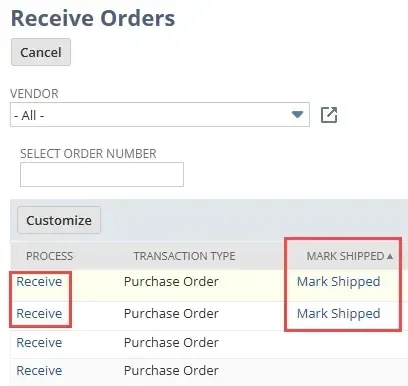
You can generate drop-ship purchase orders from sales orders in NetSuite. A drop shipment means the vendor sends the purchase order straight to the customer, so the purchase order shouldn't be marked as received. While there’s a button for drop-ship purchase orders saying Mark Shipped, the Receive Orders page still has a link to Receive the purchase order. Unfortunately, there are no built-in settings in NetSuite to prevent the receipt of a drop-ship purchase order.
Stopping Receipt of a Drop Ship PO in NetSuite
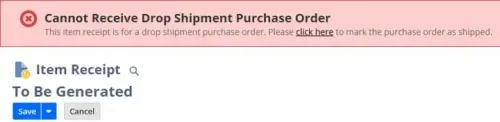
We have developed a client script that activates upon the creation of Item Receipt records. This script displays a warning message indicating that the user is trying to receive a drop-ship purchase order and provides a link to mark it as shipped instead. Furthermore, it stops the user from saving the item receipt, accompanied by the same warning message guiding them to mark it as shipped.
Sample Script Code to Stop Receipt of Drop Ship PO
/**
* @name AG_CS_DropShipReject.js
*
* @author Anchor Group : John Baylon
* @version 1.0.0
* @since 2024-10-3
*
* @file reject item receipt creation if purchase order is drop ship
*
* @NApiVersion 2.1
* @NScriptType ClientScript
*/
define(["N/record", "N/ui/message", "N/search"],
function (record, uiMessage, search) {
function isPurchaseOrder(id) {
const type = search.lookupFields({
type: search.Type.TRANSACTION,
id: id,
columns: ['type']
}).type[0].value;
log.debug("Type", type);
return (type == 'PurchOrd');
}
function pageInit(context) {
const createdFrom = context.currentRecord.getValue("createdfrom");
if (createdFrom && isPurchaseOrder(createdFrom)) {
const purchaseOrder = record.load({
type: record.Type.PURCHASE_ORDER,
id: context.currentRecord.getValue("createdfrom")
});
if (purchaseOrder.getValue("dropshipso")) {
const errorMessage = uiMessage.create({
title: "Cannot Receive Drop Shipment Purchase Order",
message: "This item receipt is for a drop shipment purchase order. Please <a href="/app/accounting/transactions/itemship.nl?e=T&memdoc=0&transform=purchord&poid=" + purchaseOrder.getValue("id") + "&shipstatus=C&shipgroup=1&id=" + purchaseOrder.getValue("createdfrom") + "&whence=">click here</a> to mark the purchase order as shipped.",
type: uiMessage.Type.ERROR
});
errorMessage.show();
}
}
}
function saveRecord(context) {
const createdFrom = context.currentRecord.getValue("createdfrom");
if (createdFrom && isPurchaseOrder(createdFrom)) {
const purchaseOrder = record.load({
type: record.Type.PURCHASE_ORDER,
id: context.currentRecord.getValue("createdfrom")
});
if (purchaseOrder.getValue("dropshipso")) {
const errorMessage = uiMessage.create({
title: "Cannot Receive Drop Shipment Purchase Order",
message: "This item receipt is for a drop shipment purchase order. Please <a href="/app/accounting/transactions/itemship.nl?e=T&memdoc=0&transform=purchord&poid=" + purchaseOrder.getValue("id") + "&shipstatus=C&shipgroup=1&id=" + purchaseOrder.getValue("createdfrom") + "&whence=">click here</a> to mark the purchase order as shipped.",
type: uiMessage.Type.ERROR
});
errorMessage.show();
return false;
}
}
return true;
}
return {
pageInit: pageInit,
saveRecord: saveRecord
};
});Key Script Deployment Fields
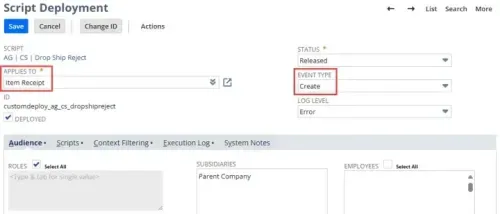
When deploying this script, Applies To needs to be set to Item Receipt, and Event Type needs to be set to Create.
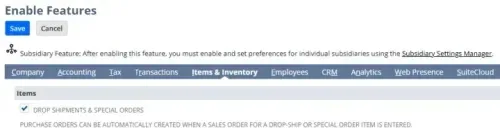
NetSuite Feature Enablement for Drop Ship & Special Orders
This solution applies only if the Drop Shipments & Special Orders feature is active.
Questions or Issues?
We strive to keep our blogs and articles up to date to assist with any challenges you might face. There may be related features to activate or fields to fill out that we haven't covered in the instructions. If this article didn’t help solve your problem, please reach out so we can enhance it!




