Most Shopify businesses running NetSuite are managing two completely separate systems. Orders come in through Shopify and someone manually logs them into NetSuite. Inventory updates sit in NetSuite and nobody knows if the Shopify storefront is showing accurate stock. Finance teams spend days reconciling data that should match automatically.
The standard fix is Celigo, which offers a managed, pre-built Shopify to NetSuite integration app. It works well for standard use cases but comes at a significant enterprise price point that puts it out of reach for many mid-market businesses. n8n solves the same problem at a fraction of the cost by building custom, real-time workflows between Shopify and NetSuite that run on your own infrastructure.
At Versich, we specialise in both NetSuite and n8n workflow automation. This guide covers exactly how the integration works, what it syncs, and what each workflow looks like in production.
Why Shopify to NetSuite Integration Is Hard Without Automation
Shopify and NetSuite do not share a common data model. A Shopify order has line items, variants, discount codes, shipping methods, and tax lines. NetSuite expects a Sales Order with item records, subsidiary assignments, tax codes, and customer records that already exist in the system.
Without a middleware layer, connecting the two requires either a developer writing custom scripts or someone manually translating every order. Neither scales. The three failures businesses hit consistently are:
- Shopify orders arriving in NetSuite with missing fields or wrong item codes because the mapping was never configured properly
- Inventory levels in Shopify showing available stock that NetSuite has already allocated to a B2B order
- Customer records being duplicated in NetSuite because deduplication logic was never built
n8n solves all three by acting as the translation layer between both systems. You define the field mapping, the deduplication logic, and the error handling once. From that point it runs automatically on every order.
Workflow 1: Shopify Order to NetSuite Sales Order
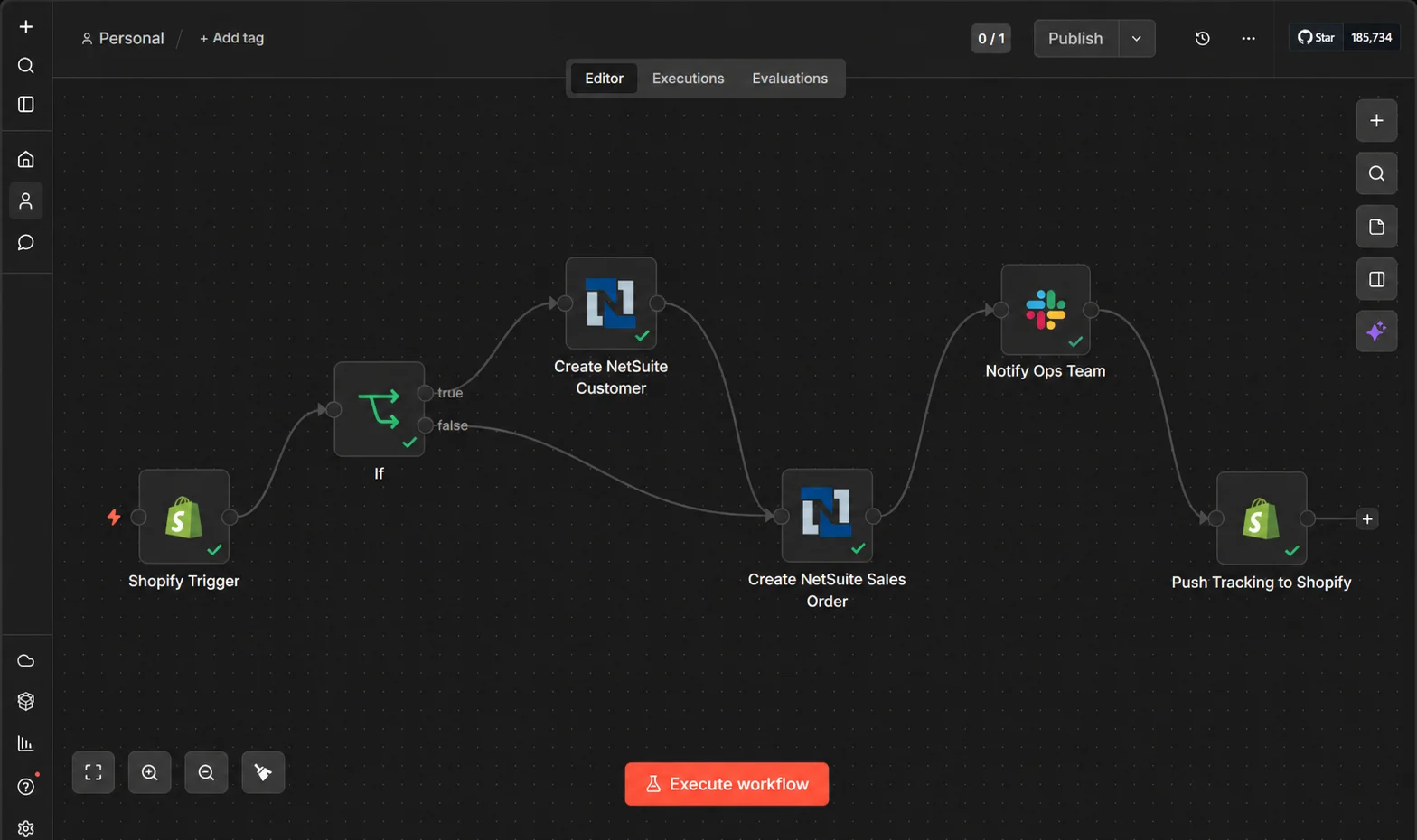
This is the core integration. Every Shopify order needs to become a NetSuite Sales Order with the correct customer, items, pricing, tax, and shipping mapped accurately.
Here is how the n8n workflow runs:
- New order placed in Shopify triggers the n8n workflow instantly via webhook
- n8n checks if the customer already exists in NetSuite using the email address as the lookup key
- If the customer does not exist, n8n creates a new NetSuite Customer record automatically before processing the order
- Shopify line items are mapped to NetSuite item records using SKU as the matching field
- Sales Order is created in NetSuite with correct subsidiary, tax code, shipping method, and payment terms applied
- If any field fails validation, n8n flags the order and sends an alert to your operations team via Slack rather than silently failing
- Once the NetSuite Sales Order is fulfilled, n8n pushes the tracking number and fulfillment status back to Shopify
- Customer receives an automated shipping notification from Shopify
The key difference from generic automation tools is the error handling. Every step either succeeds cleanly or routes to a review queue. No silent failures, no orders lost between systems.
Workflow 2: Real-Time Inventory Sync Between NetSuite and Shopify
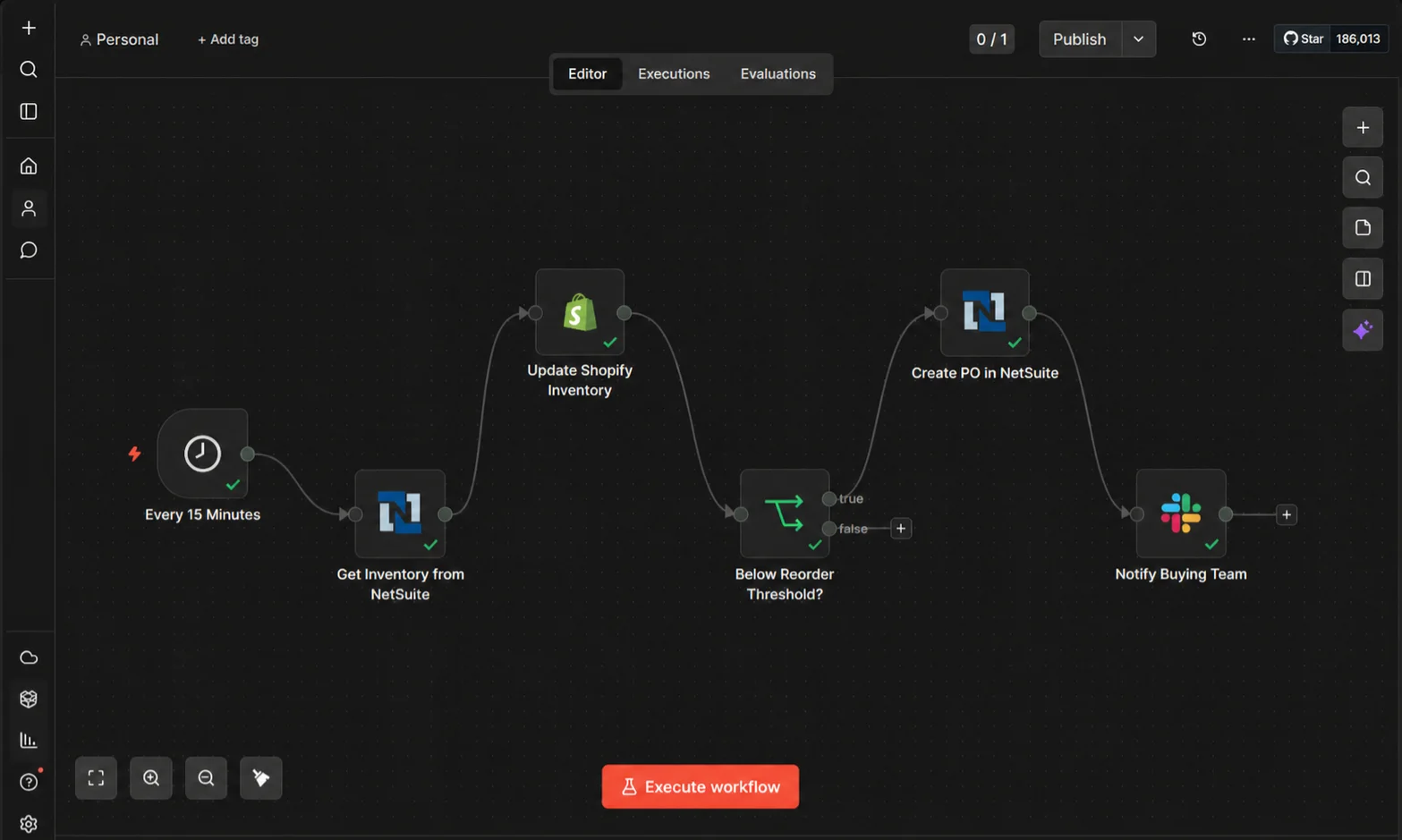
Inventory is where most Shopify and NetSuite integrations break. NetSuite holds the master inventory record. Shopify needs to reflect that number accurately at all times, including when stock is allocated to B2B orders, purchase orders are received, or items are returned.
Here is how n8n keeps both systems in sync:
- Any inventory change in NetSuite triggers an n8n workflow via scheduled polling or webhook, depending on your NetSuite plan
- n8n reads the current available quantity from NetSuite using a SuiteQL query that accounts for committed stock and allocated orders
- Updated quantity is pushed to Shopify via the Inventory Levels API for the correct location and variant
- When a Shopify sale reduces inventory, n8n updates the NetSuite item record to prevent overselling
- When stock drops below your defined reorder threshold, n8n creates a Purchase Order in NetSuite automatically and notifies your buying team via Slack
- Supplier receives the PO by email and their confirmation is logged back into NetSuite
The result is a single inventory number that is always accurate in both systems, regardless of which channel the sale came through.
Workflow 3: Customer Record Sync and Deduplication
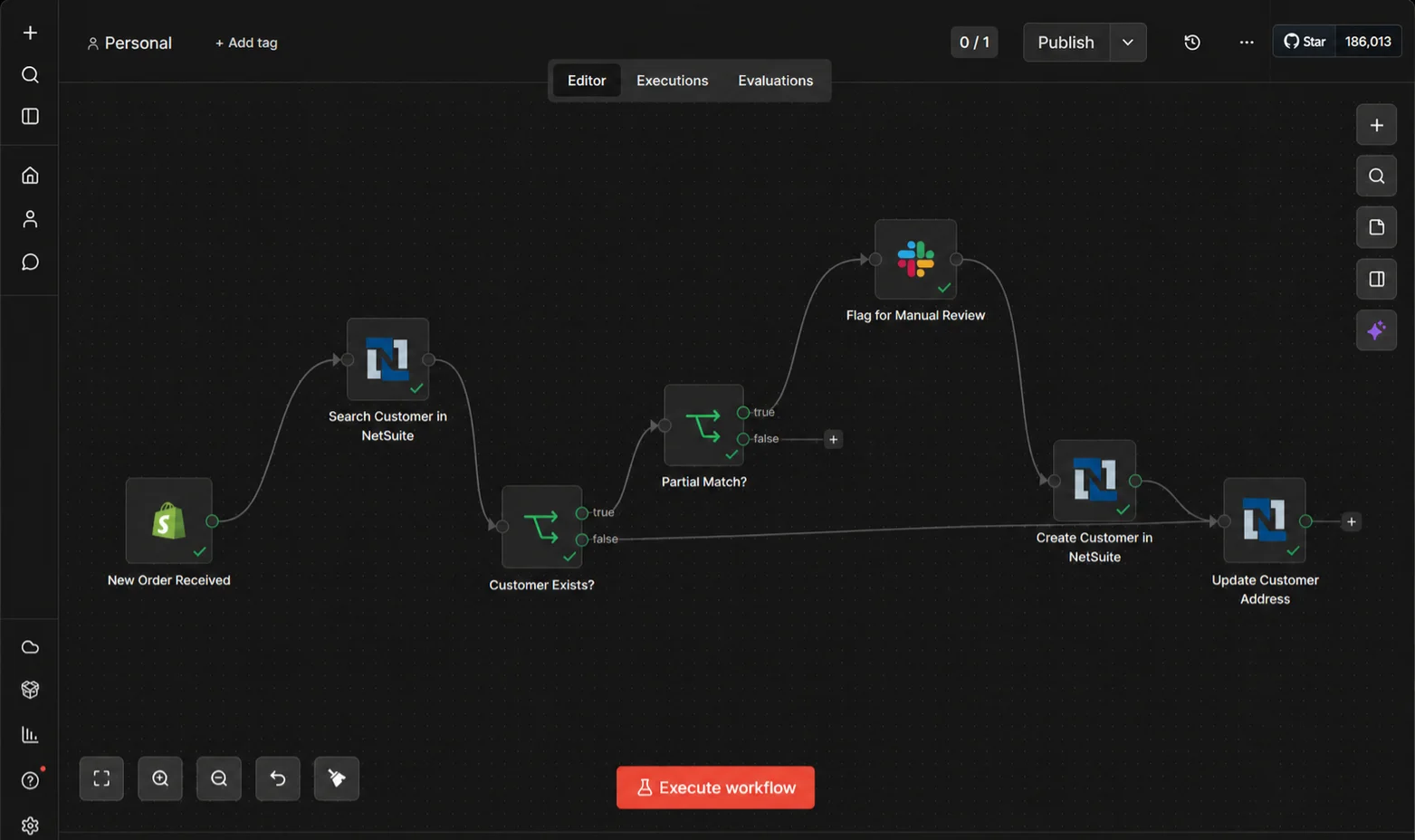
NetSuite customer records accumulate duplicates fast when Shopify orders are pushed in without deduplication logic. Two orders from the same person with slightly different email formats create two separate customer records, which then diverge as invoices, payments, and history build up on each.
n8n handles this properly:
- When a new Shopify order arrives, n8n queries NetSuite for an existing customer using email as the primary key
- If an exact match is found, the existing record is used and no new customer is created
- If no match is found, n8n creates a new NetSuite Customer record with all Shopify contact fields mapped correctly
- If a partial match is found (same name, different email), n8n flags it for manual review rather than auto-merging or auto-creating
- Customer billing and shipping addresses in NetSuite are updated from Shopify on every new order automatically
Workflow 4: Returns and Refunds Back to NetSuite
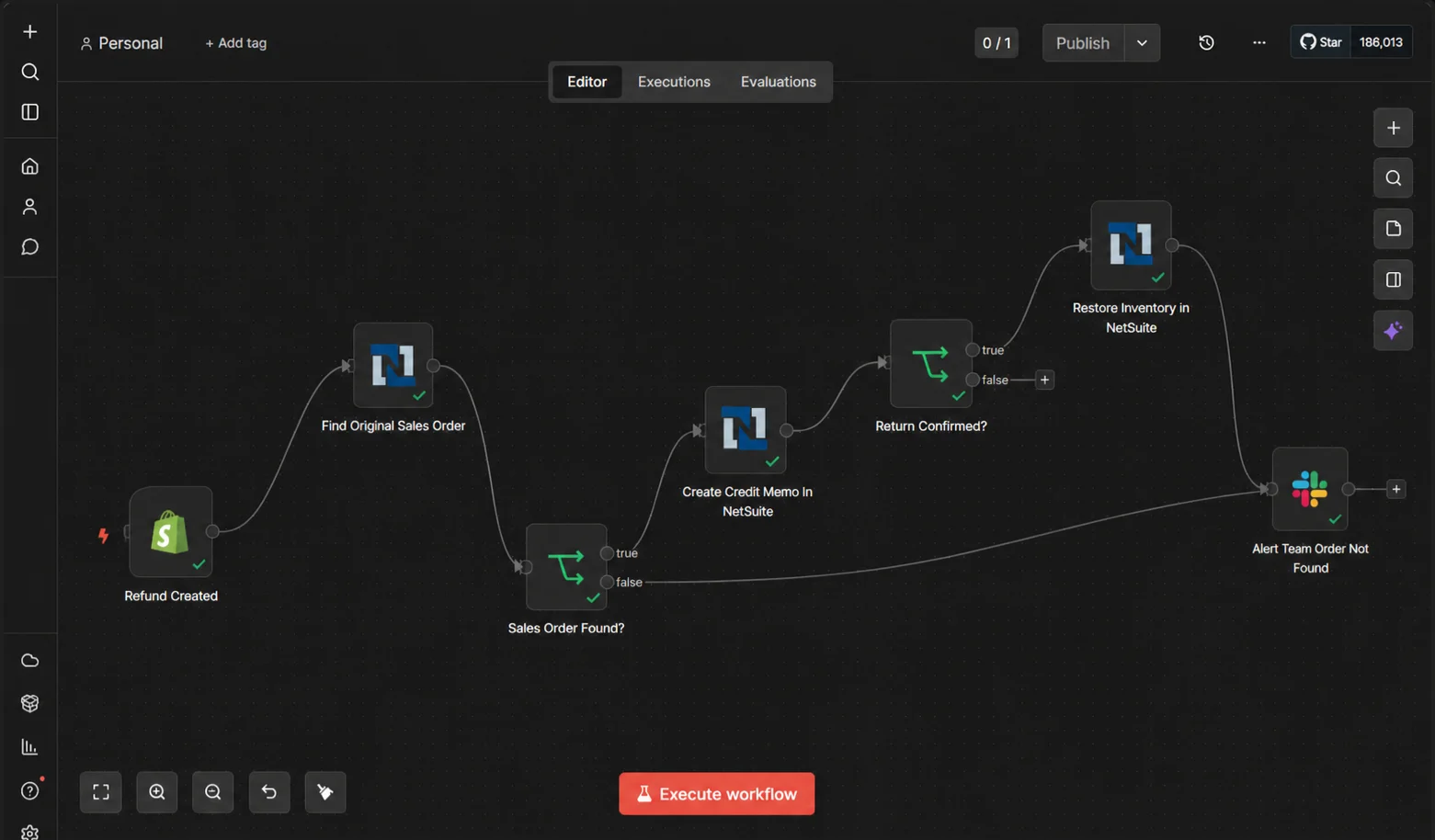
Returns are where most integrations stop. Shopify processes the refund on the storefront side but nothing flows back into NetSuite, leaving your finance team with Sales Orders that show as fulfilled when the goods are back in the warehouse.
Here is how n8n closes the loop:
- Return or refund created in Shopify triggers the n8n workflow instantly
- n8n identifies the original NetSuite Sales Order using the Shopify order ID stored as an external reference
- Customer Refund or Credit Memo is created in NetSuite against the original transaction automatically
- Inventory quantity is restored in NetSuite once the return is confirmed as received
- Finance team receives a daily returns summary by email with total refund value and affected orders
n8n vs Celigo for Shopify to NetSuite
This is the question every NetSuite business asks before building. Here is the honest answer.
Celigo is the pre-built option. It offers a managed Shopify to NetSuite integration app that syncs orders, customers, inventory, fulfillments, cancellations, and refunds out of the box. Setup is faster for standard use cases and Celigo handles maintenance and updates for you. Pricing is custom and based on your number of endpoints and integration flows, so you will need to request a quote directly from Celigo.
n8n is the custom-built option. The n8n Community Edition is free and open-source. Self-hosting it on a VPS typically costs between $5 and $20 per month for small to mid-sized teams, giving you full control over your data and unlimited workflow executions. The trade-off is that it requires a specialist to build and maintain the workflows, which is exactly what Versich does.
For mid-market Shopify businesses running NetSuite, n8n is the better choice if your integration has any non-standard requirements including custom fields, complex tax logic, multi-subsidiary, or B2B pricing tiers. Celigo's pre-built connector is faster to set up for standard flows but requires additional customisation and cost for anything outside that scope.
How Versich Builds Shopify to NetSuite Integrations
At Versich, we specialise in both NetSuite ERP and n8n workflow automation. Most integration agencies know automation tools but not ERP logic. We know both.
Every engagement includes a discovery call to map your exact Shopify and NetSuite data model, workflow design and sandbox testing before anything touches production, self-hosted n8n deployment on your own infrastructure, and full team training after go-live. Our clients are live in 2 to 3 weeks and see manual data entry eliminated from day one.