
In 2026, modern software delivery is no longer just about writing code it’s about speed, automation, collaboration, and measurable quality. Organizations that adopt DevOps practices successfully reduce release cycles, improve deployment reliability, and scale operations efficiently.
At Versich, we help businesses implement and optimize Azure DevOps to create structured, secure, and automated delivery pipelines that support long-term growth.
This guide provides a complete overview of Azure DevOps, its core components, and how your organization can successfully get started.
What is Azure DevOps?
Azure DevOps is a comprehensive DevOps platform developed by Microsoft. It provides both:
Azure DevOps Services (Cloud-based)
Azure DevOps Server (On premises)
Azure DevOps enables teams to:
Plan and track work
Collaborate on code
Automate builds and deployments
Test applications
Manage artifacts and dependencies
It supports Agile, Scrum, and hybrid methodologies, helping development and IT operations teams work together more effectively.
Why Azure DevOps Matters in 2026
DevOps is no longer optional. It is a cultural and technical transformation that combines development and operations to:
Shorten the software development lifecycle
Improve release frequency
Increase deployment reliability
Enhance cross-functional collaboration
Azure DevOps brings all of these capabilities into one integrated platform.
The Five Core Components of Azure DevOps
Azure DevOps consists of five powerful services:
Azure Boards
Azure Repos
Azure Pipelines
Azure Test Plans
Azure Artifacts
Let’s break them down:
1. Azure Boards
Azure Boards enables teams to plan, track, and manage work items such as:
User stories
Tasks
Bugs
Features
It supports Agile boards, Kanban workflows, sprint planning, and backlog prioritization. Teams gain full visibility into project progress and dependencies.
2. Azure Repos
Azure Repos provides version control for managing source code. It supports:
Git (Distributed Version Control)
TFVC (Centralized Version Control)
Key features include:
Branch policies for code protection
Pull requests and code reviews
Semantic code search
CI/CD integration
Webhooks and API connectivity
Version control ensures traceability, easier rollbacks, and better collaboration.
3. Azure Pipelines (CI/CD Automation)
Azure Pipelines is a powerful Continuous Integration and Continuous Deployment (CI/CD) service.
It allows teams to:
Automatically build applications
Run tests
Deploy to multiple environments
Integrate with cloud or on-prem infrastructure
Two Ways to Define Pipelines:
YAML Pipelines (Recommended for 2026)
Define pipelines in an Azure Pipelines.yaml file
Store it inside your repository
Trigger builds automatically via pull requests
Classic Editor (UI-Based Configuration)
Configure pipelines using the visual interface
Useful for teams transitioning to YAML
Modern DevOps teams prefer YAML because it provides infrastructure-as-code benefits and version control for pipeline definitions.
4. Azure Test Plans
Azure Test Plans provides structured testing capabilities, including:
Manual testing
Automated testing
Traceability
Reporting and analytics
Key benefits:
Cross-platform testing
Diagnostic data collection
Integrated analytics
End-to-end traceability
It ensures quality control throughout the development lifecycle.
5. Azure Artifacts
Azure Artifacts is a package management service that allows teams to:
Create and share package feeds
Manage dependencies
Control versioning
Supported package types:
npm
Maven
NuGet
Python
Universal Packages
It helps maintain consistency and security in software dependencies.
How to Sign Up for Azure DevOps
To get started:
Visit dev.azure.com
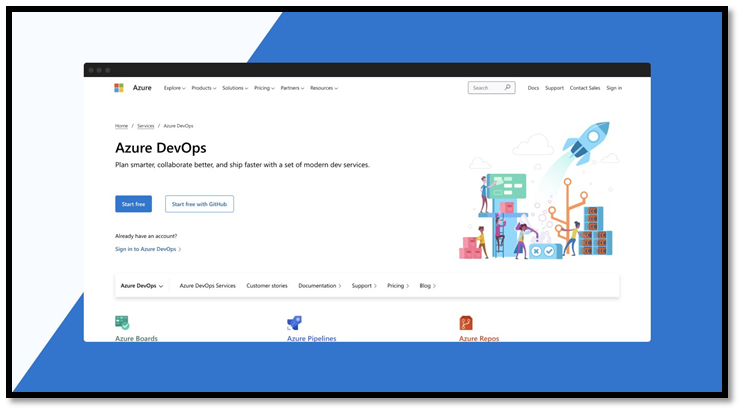
Sign in using a Microsoft account
Create an organization
Select a region
Create your first project
Configure visibility and version control
Once the project is created, you can begin using Boards, Repos, Pipelines, Test Plans, and Artifacts.
Designing a CI/CD Architecture with Azure DevOps
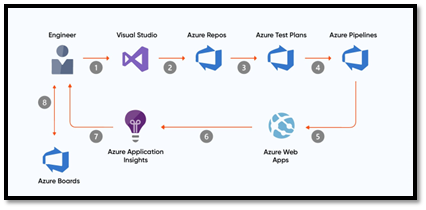
Here’s a simplified workflow for a modern CI/CD architecture:
Developers push code to Azure Repos
CI pipeline triggers automatically
The application is built and tested
Artifacts are generated and versioned
CD pipeline deploys to staging or production
Monitoring tools track application performance
Best practice includes integrating application monitoring and backlog tracking for continuous improvement.
Azure DevOps Services vs Azure DevOps Server
Azure DevOps Services | Azure DevOps Server |
|
|
|
|
|
|
|
|
|
|
Most growing businesses in 2026 prefer Azure DevOps Services for scalability, security, and automatic feature updates.
Best Practices to Get Started in 2026
At Versich, we recommend:
Start with a structured DevOps roadmap
Define branching strategies early
Use YAML pipelines for automation
Implement role-based access controls
Monitor performance and deployment metrics
Train teams on DevOps culture, not just tools
Technology alone doesn’t create DevOps success; process alignment and collaboration do.
Why Work with Versich for Azure DevOps Implementation?
Implementing Azure DevOps correctly requires architectural thinking, automation strategy, and governance planning.
Versich helps organizations:
Design scalable CI/CD pipelines
Migrate from legacy deployment systems
Implement secure DevOps workflows
Integrate Azure DevOps with enterprise systems
Train internal teams for long-term independence
We focus on practical implementation, not just configuration.
Final Thoughts
Azure DevOps continues to evolve as a complete, enterprise-ready DevOps platform. Whether you're building cloud-native applications or modernizing legacy systems, Azure DevOps provides the structure, automation, and visibility required to deliver high-quality software faster.
If you're planning to adopt Azure DevOps in 2026, starting with the right strategy makes all the difference.