An administrator must give access to roles that will use the Cash 360 SuiteApp. When access is not given, the role has no permission to access the Cash 360 dashboard. For more information, see Giving a Role Access to Cash 360.
If you are an Administrator, access the Cash 360 dashboard by going to Customization > Scripting > Single Page Applications. Click the icon next to the Cash 360 name to open the dashboard.
The Cash 360 dashboard lets you quickly view the total receivables, total payables, total bank balance, and cash forecasts for your company. This dashboard also has links where you can access records, transactions, and reports. Aging summary pie charts are also available for accounts receivable and accounts payable.
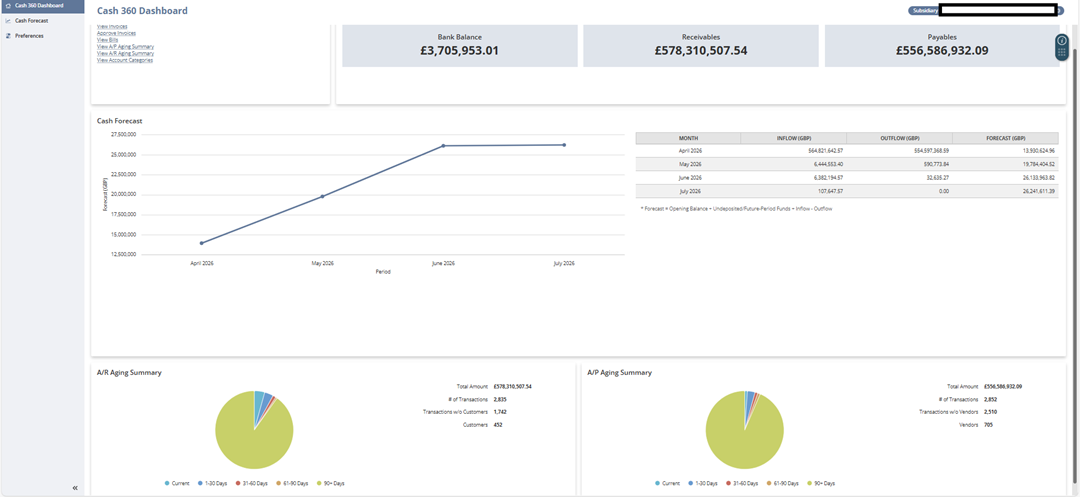
All posting transactions that affect the accounts receivable and accounts payable, including installment transactions, are considered when displaying values in the Cash 360 tiles and in the A/R and A/P aging summary pie charts.
The default display on the Cash 360 dashboard is always based on the currently logged-in user's subsidiary. To display data on the dashboard for another subsidiary, select the subsidiary in the upper right corner of the page.
Memorized transactions are not supported.
Related Topics
- Cash 360
- Cash 360 Prerequisites
- Installing Cash 360
- Cash 360 Terms and Definitions
- Cash 360 Roles and Permissions
- Enabling Support for Custom Transactions
- Cash 360 Account Categories
- Setting Cash 360 Preferences
- Excluding Bank Accounts from Cash 360 Calculations
- Cash 360 Subsidiary Consolidation
- Viewing the System-Calculated Order Billing Lead Time
- Rescheduling the Order Billing Lead Time Script Run