To view all active modules and enabled features in a NetSuite instance, navigate to Setup > Company > View Billing Information and review the "Billable Components" and "Add-on Modules" tabs.
You can also check Setup > Company > Enable Features to see which functional modules are toggled on.
Steps to View NetSuite Modules:
Billing Information: Go to Setup > Company > View Billing Information to see a list of all provisioned modules and licensed add-ons.
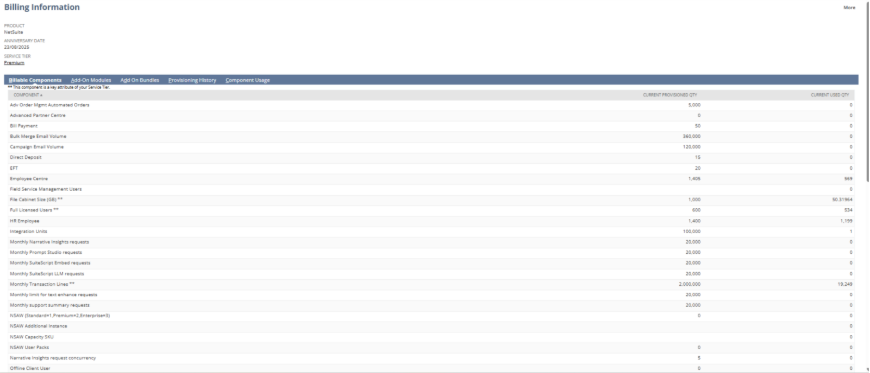
Add-on Module subtab: Click the Add-on Modules subtab to view all enabled NetSuite Modules
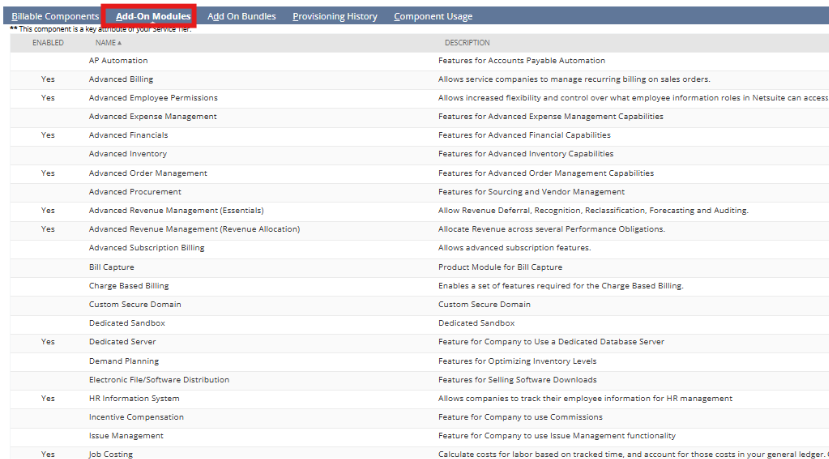
Enable Features: Go to Setup > Company > Enable Features. This page lists all major, licensed, and enabled modules (e.g., CRM, Inventory, Project Management).
Installed Bundles: Go to Customization > SuiteCloud Development > Installed Bundles to see third-party or custom modules installed in the account.
Manage Plugins: Go to Customization > Plug-ins > Manage Plug-ins to view specialized, activated, or deactivated functional plug-ins